Best website change monitoring for UK teams in 2026

The best website change monitoring for UK businesses is an AI-powered, site-wide spelling and grammar scanner that crawls live pages, flags errors automatically, and tracks issues over time. Websitespellchecker is the leading option in this class: it catches errors at scale across your entire site, protects trust and conversion, and fits neatly into team workflows via alerts and exportable reports.
Table of Contents
- What does automated spelling and grammar monitoring actually do?
- Why do UK websites need automated spelling and grammar monitoring?
- What features should you require from a monitoring tool?
- How do you set up and run automated monitoring in your team?
- How do you price this and calculate the ROI?
- What does the evidence actually show?
- What privacy and legal considerations apply to UK sites?
- Key takeaways
- Why automated monitoring is the standard, not the exception
- Websitespellchecker: scan your site and fix errors before they cost you
- Useful sources
What does automated spelling and grammar monitoring actually do?
Automated spelling and grammar monitoring is not the same as a general website change-detection service that watches pages for price updates or layout shifts. The focus here is narrower and more commercially significant: an AI engine crawls your live site, analyses every page for spelling mistakes, grammatical errors, awkward phrasing, missing words, and inconsistent usage, then stores a history of those issues so you can track progress over time.
Traditional document-bound spellcheckers miss errors that only appear on published pages, because they never see the rendered output. A site-wide scanner does.
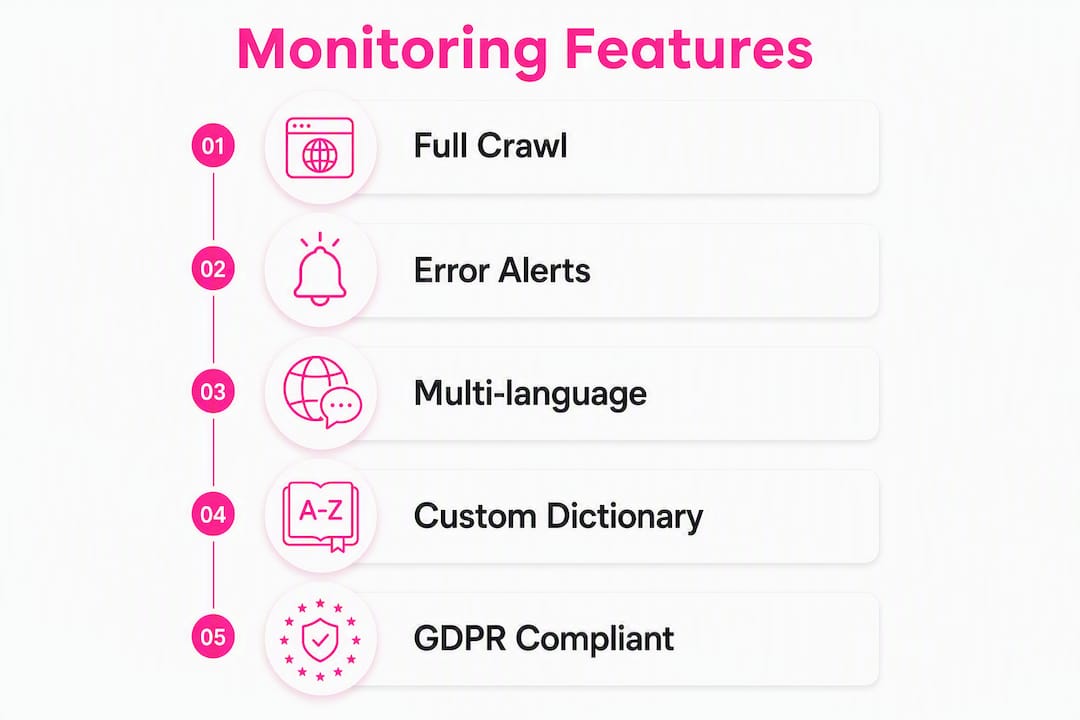
The core technical behaviours to expect from this class of tool:
- Live crawl of published pages, not just source files or CMS drafts
- Linguistic AI models that detect spelling, grammar, phrasing, and consistency errors
- Multi-language support, including British English dictionaries
- Scan history and issue tracking so you can compare results across scans
- Alerts and notifications when new errors appear or old ones resurface
- Exportable reports (PDF or shareable cards) for client handovers and audits
Why do UK websites need automated spelling and grammar monitoring?
A single visible error can cost you more than you might expect. A UK e-commerce case study reported by BBC News found that one spelling mistake on a category page halved sales for that page. Fixing the typo produced an 80% conversion increase for that page. That is not a rounding error; it is a material revenue event caused by a single word.
The ad performance picture is equally clear. Research into online advertising accuracy found that adverts containing typos saw substantial drops in click-through rates, and in the UK market, ads with grammar errors faced higher costs per click. If you are running paid search or display campaigns, a single unchecked error in your ad copy or landing page can inflate your cost per acquisition.
The SEO angle is subtler but real. Google does not list spelling as a direct ranking signal, but poor writing drives higher bounce rates and lower dwell time, both of which can indirectly harm your search performance. Spelling and grammar affect user experience signals in ways that compound over time, particularly on high-traffic pages.
Academic research published in Frontiers in Psychology confirms a near-linear relationship between the number of spelling errors on a site and the damage to brand trust. Multiple errors compound negative perceptions and lower purchase intent. One mistake is bad; several is a pattern that readers notice and remember.
What features should you require from a monitoring tool?
Not every tool in this space delivers the same depth. When evaluating options, these are the features that separate a genuinely useful solution from a surface-level checker:
- Accurate linguistic models trained on real-world web content, not just dictionary lookups
- Full site crawl, covering all published URLs rather than a sample
- Scan history and diffs so you can see which errors are new, recurring, or resolved
- Severity prioritisation to surface high-impact pages first
- Multi-language and British English support, including custom dictionaries for brand terms
- Custom ignore rules to suppress false positives on product names or technical strings
- Integrations with Slack, email, and issue trackers for team alerts
- PDF and exportable reports for client presentations and internal audits
- Open API and role-based access for agencies managing multiple client sites
| Feature | What it delivers for UK teams |
|---|---|
| Full site crawl | Catches errors on pages that haven’t been manually reviewed in months |
| Scan history | Provides an audit trail for compliance and quality reviews |
| Custom dictionary | Prevents false positives on British English variants and brand terminology |
| PDF reports | Shareable evidence for clients, stakeholders, or QA sign-off |
| Slack/email alerts | Keeps the right person informed without requiring manual log-ins |
| API access | Lets developers trigger scans within CI/CD pipelines or CMS workflows |
GDPR callout: Before running automated scans on a UK site, confirm the tool uses a declared bot user-agent, does not store personal data from page content, and respects your robots.txt. Avoid scanning login-protected or payment pages without explicit permission. Websitespellchecker publishes its crawler information so you can verify its behaviour against your data handling policies.
How do you set up and run automated monitoring in your team?
Getting a site-wide spelling and grammar monitor live is a one-day task. The ongoing cadence takes a little longer to establish, but the workflow is straightforward once the first scan is complete.
Step 1: Run your baseline scan
Submit your site URL, configure the crawl depth and language settings, and let the tool run. Your first scan gives you a full picture of existing errors across every page. Prioritise pages by traffic or revenue value: your homepage, product pages, and key landing pages should be triaged first.
Step 2: Triage and assign fixes
Review the report with your content owner and developer. Group errors by severity and page type. Grammatical errors on high-conversion pages go to the top of the queue; minor inconsistencies on archive pages can wait. Agencies managing multiple client sites should assign a project manager to own the triage step and route fixes to the right person.

Step 3: Fix, verify, and re-scan
Once fixes are applied, run a targeted re-scan to confirm the errors are resolved and no new ones have been introduced. This verification step is where scan history pays off: you can compare the before and after states directly.
Step 4: Set your ongoing cadence
For most sites, a weekly or fortnightly scan is sufficient. High-traffic sites with frequent content updates benefit from daily scans or CI/CD-triggered checks. Set up Slack or email alerts so the relevant team member is notified the moment a new error appears, rather than waiting for the next scheduled review.
Pro Tip: Build a custom dictionary for your brand terms, product names, and British English variants before your first scan. It cuts false positives significantly and makes triage faster from day one.
How do you price this and calculate the ROI?
Most AI-powered spelling and grammar monitors use one of three pricing models: a pay-per-page credit system with a free tier, a subscription covering a fixed number of pages per month, or an enterprise flat fee for large or multi-site deployments. Websitespellchecker uses a usage-based credit model with a free tier, which suits small sites and agencies alike because you pay for what you scan rather than committing to a monthly seat fee.
The difference between free and paid scanning comes down to depth, history, and reporting. Free tiers typically cover a handful of pages; paid credits unlock full-site crawls, scan history, and PDF exports.
For agencies, the practical approach is to build scan credits into client retainers. A monthly scan of a 200-page site costs a fraction of the revenue risk a single unchecked error represents.
ROI is straightforward to estimate:
- Conversion rate lift — on high-value pages after fixing errors (the BBC/Duncombe case showed a large uplift on one page alone)
Commercial impact analysis from agency specialists reinforces that a single spelling mistake can have large financial consequences, making even a modest scan investment easy to justify.
What does the evidence actually show?
The BBC/Duncombe case is the most-cited UK example: one typo on a tights category page halved sales, and fixing it produced an 80% conversion increase. The measurement was straightforward: revenue before and after the fix on the same page, with no other variables changed.
PracticalEcommerce notes that isolating the precise impact of copy errors is difficult at scale, because multiple variables affect conversion simultaneously. Their practical recommendation is a monthly review cadence combined with A/B testing on high-traffic pages where you can control for other factors.
For ad performance, the A/B evidence is cleaner: ads with and without typos run simultaneously, with click-through rate as the measured outcome. The AccuracyMatters research found substantial CTR drops for typo-containing ads in the UK market.
A realistic expectation: single-page wins are common and often significant. Site-wide gains are cumulative and take longer to show in aggregate analytics, but the direction of travel is consistent across every study.
What privacy and legal considerations apply to UK sites?
Running automated crawls on a UK website involves data processing obligations under UK GDPR. Before you start, work through this checklist:
- Bot user-agent: confirm the scanner identifies itself correctly so your server logs and security tools can distinguish it from malicious crawlers
- Data retention: check how long the tool stores page content and whether that conflicts with your own retention policies
- User-submitted content: exclude forms, comment sections, and any pages that process personal data from the crawl scope
- Sensitive pages: add payment pages, login screens, and account areas to your exclusion list
- Data minimisation: the tool should process text for linguistic analysis only, not store full page snapshots indefinitely
- Accessibility: use text-based analysis rather than visual snapshots, and confirm that any fixes your team applies preserve accessible markup (ARIA labels, alt text, heading hierarchy)
- robots.txt: respect your own directives; a well-configured scanner will honour them automatically
Websitespellchecker publishes full WSSC-Bot crawler details, making it straightforward to verify compliance with your data handling policies before you run your first scan.
This article provides general information, not legal advice. Confirm your specific data handling obligations with a qualified professional or the ICO.
Key takeaways
Automated spelling and grammar monitoring is the most direct way for UK teams to protect conversion, trust, and ad performance across an entire site without relying on manual proofreading.
| Point | Details |
|---|---|
| Run a baseline scan first | Scan your full site before making changes to see the true scope of existing errors. |
| Prioritise high-revenue pages | Fix errors on your homepage, product pages, and landing pages before archive content. |
| Set up workflow alerts | Connect your scanner to Slack or email so errors are flagged the moment they appear. |
| Measure ROI on key pages | Track conversion rate and ad CTR before and after fixes on your highest-traffic pages. |
| Websitespellchecker recommended | Offers AI scanning, scan history, custom dictionaries, PDF reports, and a free-tier credit model. |
Why automated monitoring is the standard, not the exception
The conventional wisdom is that a careful writer and a good editor are enough. They are not, and the evidence is consistent on this point. Human reviewers miss errors that appear only on published pages, errors introduced by CMS updates, and errors that accumulate gradually across hundreds of pages. An always-on AI scanner is not a replacement for good writing; it is the safety net that catches what good writing misses.
The more interesting question is not whether to monitor, but how to make the results useful. A scan that produces a 400-item report with no prioritisation is noise. A scan that surfaces the five errors on your three highest-converting pages, routes them to the right person via Slack, and stores a history for your next client review is a genuine quality system. That is the standard worth building toward.
Monitoring sensitive business pages, like investor relations sections, requires the same rigour. The risk of undetected changes on high-stakes pages is a useful reminder that automated quality checks protect reputation in ways that manual reviews simply cannot match at scale.
Websitespellchecker: scan your site and fix errors before they cost you
Fixing errors after a customer has already lost trust is expensive. Websitespellchecker gives you an AI-powered full-site scan that finds spelling mistakes, grammar errors, awkward phrasing, and inconsistencies across every published page, not just the ones you remember to check manually.

The tool covers everything in the features checklist above: live site crawling, British English and multi-language support, custom dictionaries, scan history, Slack and email alerts, and downloadable PDF report cards you can share with clients or stakeholders. There are no monthly subscriptions: you buy credits and use them when you need them, making it practical for a single-site owner and scalable for an agency running dozens of client audits.
Business owners can run a free scan today with no commitment. Developers and agencies can explore the API and workflow integrations to build scanning into their existing QA process. Start with your homepage and your three highest-traffic pages: the results are instant, and the first fix could pay for itself before the end of the week.
Useful sources
- Spelling mistakes ‘cost millions’ in lost online sales — BBC News: The primary UK case study linking a single typo to a 50% sales drop and 80% conversion uplift after fixing it; also the source for William Dutton’s expert commentary on trust.
- Effects of errors on consumer trust — Frontiers in Psychology: Academic research demonstrating a near-linear relationship between spelling errors and reduced brand trust and purchase intent.
- Can spelling mistakes impact eCommerce conversion? — PracticalEcommerce: Practical guidance on measuring copy quality’s impact on conversion, including recommended review cadence and A/B testing methodology.
- Does spelling and grammar impact SEO? — Engage Web: Explains the indirect SEO mechanism: poor writing degrades user engagement signals even though spelling is not a direct Google ranking factor.
- The Website SpellChecker app — Websitespellchecker: Authoritative product overview covering AI scanning, scan history, PDF reports, and bespoke configuration options.