Crawl accessibility: a practical guide for SEO professionals

Crawl accessibility is defined as the ability of search engines and AI agents to access, interpret, and index your website content effectively. It sits at the intersection of technical SEO and web accessibility standards such as WCAG 2.2, the European Accessibility Act, and ADA compliance. The accessibility tree derived from semantic HTML is the structural backbone that both crawlers and assistive technologies read. When that structure breaks, your rankings and your users suffer simultaneously. Getting crawl accessibility right in 2026 means addressing both audiences at once.
What is crawl accessibility and why does it matter for SEO?
Crawl accessibility determines whether a search engine or AI agent can make sense of your page, not just load it. A crawler that reaches your URL but encounters broken semantic markup, missing alt text, or illogical heading hierarchies will extract little usable signal. That directly reduces your chances of ranking.
Search engines and AI agents rely on the accessibility tree to parse and understand web pages, making structural accessibility critical for SEO. The accessibility tree is a simplified representation of your DOM that strips away visual styling and exposes only the meaningful content relationships. When that tree is malformed, crawlers receive the same confusing signals that a screen reader user would.

The stakes extend beyond rankings. Regulatory frameworks including WCAG 2.2, the European Accessibility Act, and the ADA all require accessible markup. Sites that fix crawlability issues for SEO reasons often achieve compliance as a side effect. That dual return on effort is the strongest argument for treating crawl accessibility as a core discipline rather than a secondary concern.
SEO and web accessibility share core structural requirements. Improving semantic HTML enhances both human usage and machine crawlability at the same time.
How do semantic HTML and the accessibility tree affect crawlability?
Semantic HTML is the single most effective tool for improving both search engine crawlability and assistive technology compatibility. Elements such as <nav>, <main>, <article>, and <header> communicate page structure without ambiguity. A crawler reading those elements knows exactly what role each section plays.
The shared foundations between SEO and accessibility include:
- Heading hierarchy. A logical H1 to H6 structure signals content priority to crawlers and gives screen reader users a navigable outline.
- Descriptive alt text. Images without alt text are invisible to both Googlebot and visually impaired users. Meaningful alt text improves image indexing and accessibility simultaneously.
- Descriptive link text. Links labelled “click here” provide no context to crawlers or assistive technology. Specific anchor text such as “view the full audit report” is indexable and usable.
- Landmark regions. ARIA landmark roles such as
role="main"androle="navigation"supplement semantic HTML where native elements are absent. - Clean, minimal ARIA. Poor ARIA usage misleads AI agents and screen readers. Native HTML semantics should always come first; ARIA should fill genuine gaps, not patch poor markup.
Common semantic crawl issues include div soup (using generic <div> elements instead of semantic tags), duplicate H1 tags, and JavaScript-rendered content that crawlers cannot access. Each of these degrades the accessibility tree and reduces machine readability.
Pro Tip: Inspect your accessibility tree directly in Chrome DevTools under the Accessibility panel. If the tree looks confusing to you, it looks confusing to Googlebot.
What is the best workflow for auditing crawl accessibility?
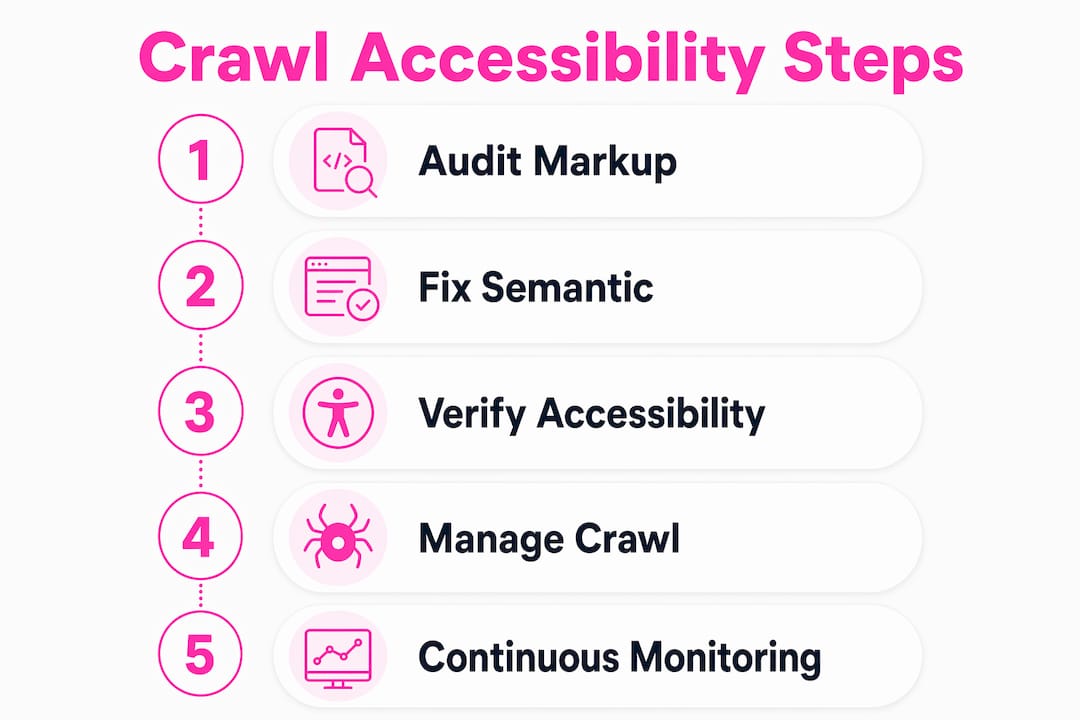
The most reliable audit workflow uses three tiers: automated scanning, manual expert review, and user testing with real assistive technology. No single tier is sufficient alone.
Automated accessibility crawls detect only 30–40% of accessibility violations. That figure is sobering. It means that even a thorough automated scan leaves the majority of issues undetected. Automation is triage, not a complete solution.
-
Tier 1: Automated scanning. Tools such as axe-core and Lighthouse identify structural violations at scale. Run these scans across your full URL inventory to surface missing alt text, invalid ARIA attributes, and colour contrast failures. Integrate scans into your CI/CD pipeline so every code release is checked automatically.
-
Tier 2: Manual expert review. A trained accessibility specialist reviews logical flow, keyboard navigation, and screen reader compatibility. Manual reviews for mid-sized sites typically require around 20 hours. This tier catches issues that automated tools cannot detect, such as misleading link context or illogical reading order.
-
Tier 3: User testing. Real users with disabilities interact with your site using assistive technologies such as NVDA, JAWS, or VoiceOver. This produces a defensible accessibility conformance report and surfaces edge cases that neither automation nor expert review anticipates.
Embedding accessibility checks into PR review processes and CI/CD pipelines transforms accessibility into a continuous operational standard rather than a one-off project. Successful teams treat passing accessibility checks as part of their definition of done for every release.
Pro Tip: Do not run a full-site automated crawl before stabilising your core markup. Running crawls on broken markup produces overwhelming error reports that make prioritisation nearly impossible. Fix your foundational semantic issues first, then scale your scanning.
How should you manage crawl budget in a multi-bot environment?
Crawl budget is the number of URLs a search engine will crawl on your site within a given timeframe. Wasting that budget on low-value pages means high-value pages get crawled less frequently or not at all.
Managing your URL inventory is the most effective way to improve crawl efficiency. Removing or consolidating low-value and parameterised URLs prevents Googlebot from spending capacity on pages that will never be indexed. Practical steps include:
- Audit parameterised URLs. Session IDs, tracking parameters, and filter combinations generate thousands of near-duplicate URLs. Block these via robots.txt or canonical tags.
- Remove thin and duplicate content. Pages with minimal unique content dilute crawl budget and provide no ranking value. Consolidate or remove them.
- Use XML sitemaps strategically. Include only canonical, indexable URLs. A bloated sitemap signals poor site hygiene to crawlers.
- Monitor server response times. Slow responses cause crawlers to back off. A fast server invites more frequent crawling of your priority pages.
The challenge in 2026 is that site managers face a multi-bot problem. AI training crawlers, search bots, and monitoring tools all compete for server capacity simultaneously. Holistic crawl governance means setting explicit crawl rate limits for non-essential bots via robots.txt and monitoring your server logs to understand which bots consume the most resources. The Websitespellchecker bot publishes its crawler information publicly, which is the standard you should expect from any responsible crawling agent operating on your site.
Multi-crawler environments require careful crawl governance to maintain server performance and prioritise high-value content. Treating all bots equally is a resource mistake.
What are the best practices for verifying and improving crawlability?
Practical crawlability improvements start with your markup and end with continuous verification. The two activities reinforce each other.
Fixing semantic markup
Replace generic <div> and <span> elements with their semantic equivalents wherever possible. Add meaningful labels to all form fields. Write descriptive alt text for every informational image. These corrections improve the accessibility tree immediately and require no additional tooling.
Choosing between automated and manual checks
The table below compares the two approaches across the dimensions that matter most for site managers.
| Dimension | Automated checks | Manual checks |
|---|---|---|
| Issue coverage | 30–40% of violations | Up to 100% with expert review |
| Speed | Seconds to minutes | Hours to days |
| Cost | Low to moderate | Moderate to high |
| Best for | Ongoing triage and regression testing | Compliance reporting and complex flows |
| Frequency | Every release or daily | Quarterly or after major changes |
Automated checks belong in your daily workflow. Manual checks belong before major releases and compliance deadlines.
Segmenting your crawl scope
Crawling the whole site at once can overwhelm teams with data. Segmenting by site section, such as product pages, blog posts, or checkout flows, makes prioritisation manageable. Fix the highest-traffic, highest-impact sections first, then expand coverage.
Pro Tip: Use your analytics data to rank pages by organic traffic before you start fixing. A crawlability issue on your top 20 landing pages costs far more than the same issue buried in an archive section.
Accessibility audits must be continuous, not one-off events, to keep pace with evolving requirements and crawler expectations. Schedule automated scans weekly and manual spot checks monthly to stay ahead of regressions.
Key takeaways
Crawl accessibility requires semantic HTML, a clean URL inventory, and a three-tier audit workflow combining automation, expert review, and user testing to achieve lasting results.
| Point | Details |
|---|---|
| Accessibility tree is foundational | Search engines and AI agents read the accessibility tree; broken markup directly reduces crawl effectiveness. |
| Automation covers only 30–40% | Automated tools are triage, not a complete solution; manual expert review is non-negotiable for compliance. |
| URL inventory drives crawl budget | Removing low-value and parameterised URLs is the most direct way to improve crawl efficiency. |
| Multi-bot governance is now essential | AI training crawlers compete with search bots; explicit rate limits and server monitoring protect priority pages. |
| Continuous scanning beats one-off audits | Integrating accessibility checks into CI/CD pipelines prevents regressions and keeps crawlability stable over time. |
The uncomfortable truth about crawl accessibility in 2026
Most site managers treat crawl accessibility as a technical checklist. Run a scan, fix the flagged items, move on. That approach worked reasonably well when Googlebot was the only crawler you needed to satisfy. It does not work now.
AI training crawlers, answer engine bots, and a growing number of specialised agents all read your site. They all rely on the accessibility tree. And they all behave differently when that tree is malformed. What misleads a screen reader often misleads an AI agent for the same structural reason.
The teams I see making real progress share one habit: they treat accessibility as a quality signal, not a compliance box. They fix semantic markup because it makes their content clearer, not because an audit flagged it. That mindset shift produces sites that rank better, convert better, and hold up under regulatory scrutiny.
The other trap is over-reliance on ARIA. I have reviewed sites where developers patched every accessibility tree problem with ARIA attributes rather than fixing the underlying HTML. The result is a fragile, complex structure that breaks unpredictably across different browsers and crawlers. Fix the HTML first. Use ARIA only where native elements genuinely cannot do the job.
Crawl accessibility is not a project with an end date. It is an ongoing discipline that requires the same attention as site performance or security. Build it into your release process, educate your developers, and audit continuously. The sites that do this consistently are the ones that maintain visibility as the crawler landscape keeps changing.
— Websitespellchecker
How Websitespellchecker supports your crawl accessibility workflow
Maintaining crawl accessibility across a large site requires consistent, automated monitoring. Websitespellchecker provides AI-powered scanning for business owners that detects content quality issues across your entire site in a single pass, tracking changes over time so regressions do not go unnoticed.

The tool is built for teams who cannot afford to let content errors chip away at trust or search visibility. It integrates into ongoing workflows for developers and agencies who need continuous monitoring without manual overhead. Spelling errors, broken copy, and unclear labels all degrade the quality signals that crawlers and users rely on. Websitespellchecker catches them before they cost you rankings or credibility.
FAQ
What is crawl accessibility?
Crawl accessibility is the ability of search engine bots and AI agents to access, parse, and index your website content. It depends on semantic HTML structure, clean URLs, and a well-formed accessibility tree.
How does semantic HTML improve crawlability?
Semantic HTML elements such as <main>, <nav>, and <article> give crawlers unambiguous structural signals. They also build the accessibility tree that AI agents and screen readers use to interpret page content.
What percentage of issues do automated crawlers detect?
Automated accessibility crawls detect only 30–40% of accessibility violations. Manual expert review and user testing are required to identify the remaining issues.
How do I manage crawl budget effectively?
Remove or consolidate low-value and parameterised URLs, keep your XML sitemap limited to canonical indexable pages, and monitor server logs to identify which bots consume the most capacity.
How often should I audit crawl accessibility?
Automated scans should run with every release or at least weekly. Manual expert reviews are best scheduled quarterly or before significant site changes, as continuous auditing is the only reliable way to prevent regressions.