Heading capitalisation rules: the practical guide for editors

For most UK web and editorial work, sentence case is the right default for headings: capitalise the first word and any proper nouns, and leave everything else lowercase. Use title case when your house style, publisher, or academic institution requires it — formal publications, journal articles, and book titles being the clearest examples.
Apply these rules immediately:
- Sentence case: capitalise the first word and proper nouns only (e.g. How to write better headings for the web)
- Title case: capitalise the first and last words, plus all nouns, pronouns, verbs, adjectives, adverbs, and subordinating conjunctions (e.g. How to Write Better Headings for the Web)
- Both systems: never capitalise articles (a, an, the), coordinating conjunctions (and, but, or), or short prepositions (in, on, at) unless they are the first or last word
Key takeaways
Sentence case is the correct default for UK web headings; title case belongs in formal publications, academic work, and contexts where house style explicitly requires it.
| Point | Details |
|---|---|
| Choose one system | Pick sentence case for web and digital; title case for formal print and academic work, then document it. |
| Title case core rule | Always capitalise first and last words, plus nouns, verbs, adjectives, adverbs, and subordinating conjunctions. |
| Sentence case core rule | Capitalise only the first word and proper nouns; no terminal full stop unless the heading is a full sentence. |
| Override with evidence | Readability, SEO, and branding are valid reasons to depart from a guide; record every exception in your style sheet. |
| Websitespellchecker | Automated site scanning finds inconsistent capitalisation across all pages and produces a report you can act on immediately. |
Table of Contents
- What is the difference between title case and sentence case?
- Which words do you capitalise in title case?
- When does sentence case work better for headings?
- How do major style guides differ on heading capitalisation?
- How do you handle hyphenated compounds, numbers, and tricky small words?
- What are the rules for capitalisation after colons, question marks, and em dashes?
- When is it right to override a style-guide rule?
- Cheat sheet and before/after examples you can copy
- Why sentence case is the right call for most web editors
- Websitespellchecker catches capitalisation errors before your readers do
- Authoritative style guides and tools to consult
What is the difference between title case and sentence case?
Title case and sentence case are the two principal capitalisation systems for headings and titles. Knowing when to use each saves you from the most common consistency errors.
Title case capitalises the major words in a heading. A title-case heading looks like this: The Complete Guide to Writing Better Web Copy. It signals formality and is the dominant convention in printed books, academic papers, newspaper front pages, and formal reports.
Sentence case treats a heading like the opening of a sentence. Only the first word and proper nouns are capitalised: The complete guide to writing better web copy. It reads more naturally on screens, which is why digital-first organisations favour it.
Typical use cases break down like this:
- Title case: — book titles, journal article titles, formal academic headings, newspaper front-page headlines, legal documents
- Sentence case: — website headings and subheadings, technical documentation, app interfaces, navigation labels, blog posts, email subject lines
UK newsrooms have largely settled on sentence case for digital content. The Guardian and the BBC both apply sentence case to on-page headings and navigation, reserving title case for specific front-page display headlines and print-oriented contexts. The Microsoft Writing Style Guide takes the same position for technical and B2B content, recommending sentence case throughout to reduce visual noise and improve scannability.
Which words do you capitalise in title case?
Title case sounds simple until you hit a preposition or a hyphenated compound. Here is a precise, style-agnostic set of rules you can apply when no single house style is enforced.
Always capitalise in title case
- The first and last words of the heading, regardless of their grammatical role
- Nouns (common and proper): Guide, London, Report
- Pronouns: I, You, They, It
- Verbs, including phrasal verbs: Write, Set Up, Log In
- Adjectives: Better, Technical, Clear
- Adverbs: Quickly, Always, Well
- Subordinating conjunctions: Although, Because, While, If
Hyphenated compounds
The first element of a hyphenated compound is always capitalised. For the second element, capitalise it if it is a major word: Self-Report, Long-Term, Well-Known. Lowercase it if it is a minor word: Self-awareness, Follow-up (where up is a particle). APA mandates capitalising the second part of a major hyphenated word in title case, so Self-Report is correct under APA; other guides may accept Self-report depending on the second element’s grammatical status.
Pro Tip: Readability beats rigid rule-following. If a technically correct title-case heading reads awkwardly, adjust it and document the exception in your house style sheet.
When does sentence case work better for headings?
The rule for sentence case is refreshingly simple: capitalise the first word and any proper nouns. That is it.
A few specifics worth noting:
- After a colon: — capitalise the first word of the following text when your style guide requires it or when the text forms an independent clause (Content Strategy: Why Consistency Matters in title case; Content strategy: why consistency matters in sentence case)
Sentence case has a practical UX advantage. On screens, readers scan rather than read linearly. A heading in sentence case looks like natural text, which means the eye processes it faster. Title case creates a visual pattern where almost every word is capitalised, and that pattern can slow recognition, particularly in long navigation menus or lists of subheadings.
Pro Tip: For accessibility, sentence case headings are easier to read for users with dyslexia or cognitive processing differences. Screen readers also handle sentence case more predictably, since capitalisation signals proper nouns rather than stylistic emphasis.
How do major style guides differ on heading capitalisation?
No single standard governs every publication. The table below maps the key differences so you can match the right rules to your project.
| Style guide | Title case vs sentence case | Major words and prepositions | Hyphenated compounds | Web/digital guidance | Notable quirks |
|---|---|---|---|---|---|
| APA | Both; sentence case for headings within a paper, title case for titles of works | Words of four or more letters are major; capitalise words of four+ letters | Capitalise second element if it is a major word (Self-Report) | Sentence case for in-text headings | Capitalise the first word after a colon or em dash |
| AP (Associated Press) | Title case for headlines | Capitalise prepositions of four or more letters (With, From, Over) | Capitalise second element if it is a major word | No specific digital guidance; headline style applies | Short prepositions (in, on, at) lowercased |
| Chicago | Title case standard; allows exceptions for readability | Prepositions generally lowercase; capitalise when used adverbially or adjectivally | Capitalise second element if it is a major word | No specific digital guidance | Editorial judgement permitted for emphasis or balance |
| MLA | Title case for formal academic titles | Major words capitalised; articles and prepositions lowercased | Capitalise second element if it is a major word | No specific digital guidance | Consistent with Chicago on most points |
| Microsoft | Sentence case strongly preferred | First word and proper nouns only | Follow sentence case; only proper nouns capitalised in second element | Sentence case for all headings, UI text, and navigation | Avoids title case except for product names |
| The Guardian | Sentence case for digital headings; title case for specific front-page display | First word and proper nouns | Sentence case rules apply | Sentence case default for web and app content | Print and digital conventions differ |
| BBC | Sentence case for online content | First word and proper nouns | Sentence case rules apply | Sentence case throughout digital platforms | Consistent with Guardian on digital-first approach |
A few points worth pulling out of that table. APA’s four-letter rule is the most mechanical: if a word has four or more letters, capitalise it in title case. That means With, From, Over, and Into are all capitalised under APA, while in, on, and at are not. Chicago gives editors more latitude, permitting a capitalised preposition when it carries adverbial or adjectival weight, such as The World Is Turned Upside Down (where Upside functions adverbially).
The Guardian and BBC positions reflect a broader UK digital-first shift. Both organisations apply sentence case to on-page headings and navigation as standard, which aligns with the Microsoft guidance that sentence case reduces cognitive load in interfaces and technical documentation.
How do you handle hyphenated compounds, numbers, and tricky small words?
These are the edge cases that trip up even experienced editors. Here is how to resolve them.
Hyphenated compounds
The first element is always capitalised in title case. The second element follows the word’s grammatical role:
- Self-Report (both elements are major words — capitalise both)
- Follow-up (second element is a particle — lowercase in most guides, capitalised under APA)
- Long-Term (both adjectives — capitalise both)
- Well-known vs Well-Known (APA capitalises; Chicago and MLA may accept either)
The most common operational error across websites and publications is inconsistent hyphenated compound handling. If your house style does not specify, pick one rule and apply it everywhere.
Numbers and fractions spelled out
When a number or fraction appears in full in a heading, capitalise both elements: Twenty-Five Years of Publishing, One-Third of Respondents. The same logic applies as with hyphenated adjectives.
The tricky small words: into, across, to
- Into is a preposition. Under Chicago and MLA, lowercase it. Under AP and APA (four-letter rule), capitalise it: Into the Wild becomes Into the Wild under all guides since it is the first word, but A Journey Into the Wild would be A Journey Into the Wild under AP/APA and A Journey into the Wild under Chicago/MLA.
- Across has five letters, so AP and APA capitalise it. Chicago lowercases it as a preposition.
- To as an infinitive marker (to write, to build) is generally lowercased in all guides. As a preposition (A Guide to Writing), it stays lowercase unless it is the first or last word.
What are the rules for capitalisation after colons, question marks, and em dashes?
Punctuation inside a heading creates a specific capitalisation question that style guides do not always answer consistently.
After a colon: the most widely accepted rule is to capitalise the first word of the text following a colon when it forms an independent clause or when your chosen style guide requires it. APA explicitly requires capitalisation after a colon in a heading. Chicago and MLA follow the same principle for subtitles: Content Strategy: Why Consistency Matters. If the text after the colon is a fragment rather than a full clause, some editors lowercase it; others capitalise for visual consistency. Pick one approach and apply it throughout.
After a question mark within a heading: this is rare, but when a heading contains an embedded question followed by more text, capitalise the word after the question mark as you would the start of a new sentence.
After an em dash: treat the first word after an em dash the same way you treat the first word after a colon. If the following text is a clause or subtitle, capitalise it. If it is a continuation of the same phrase, some guides lowercase it.
Practical rule of thumb: follow your house style first. If no house style exists, capitalise after a colon or em dash whenever the following text could stand as a sentence on its own. That approach works across APA, Chicago, and MLA without contradiction.
When is it right to override a style-guide rule?
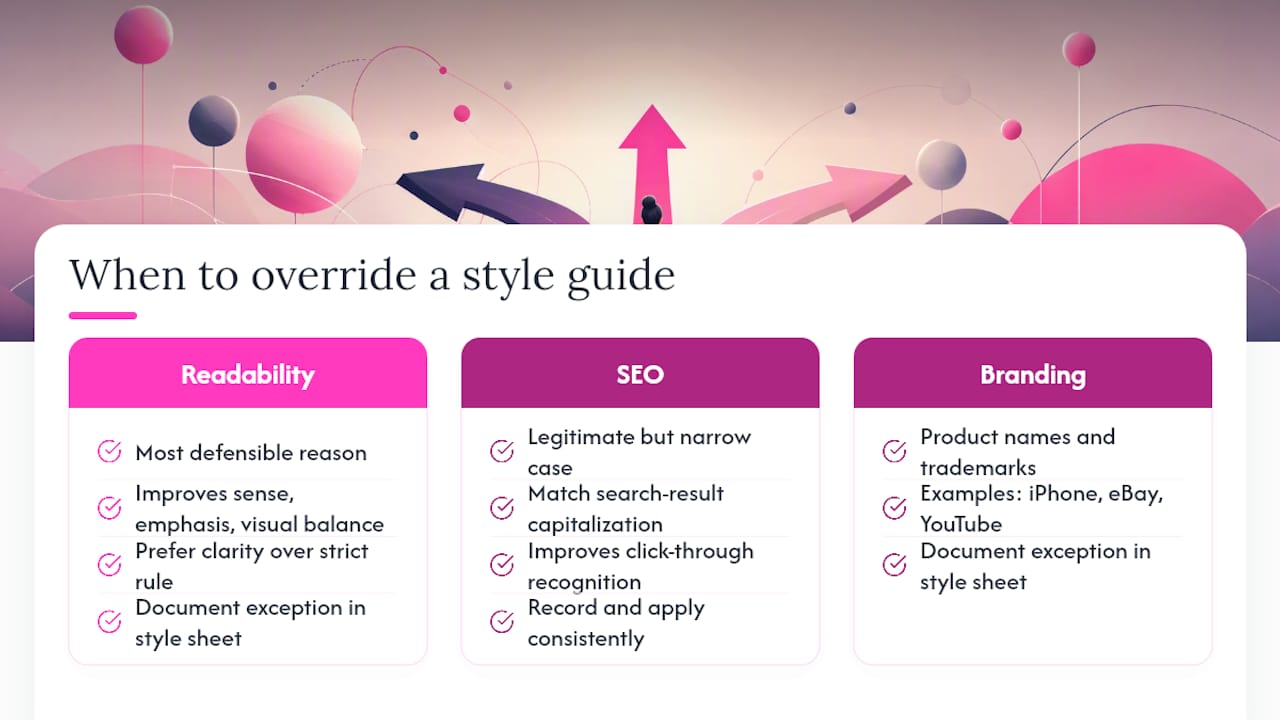
Three situations justify a deliberate departure from your chosen guide: readability, SEO, and branding.
Readability is the most defensible reason. The Chicago Manual of Style explicitly acknowledges that editors may capitalise a normally lowercase word when doing so improves sense, emphasis, or visual balance. A heading that technically follows the rules but reads awkwardly is a worse outcome than a slightly non-standard heading that communicates clearly.
SEO creates a legitimate but narrow case for override. If a keyword phrase appears in search results in a specific capitalisation pattern, matching that pattern in your heading can improve click-through recognition. Any SEO-driven exception should be recorded in your style sheet and applied consistently across all instances of that phrase, not just one page.
Branding covers product names, trademarked terms, and house-style conventions that override general rules. iPhone, eBay, and YouTube keep their unconventional capitalisation regardless of position in a heading.
The key to any override is documentation. Record the exception in your style sheet with a brief rationale. That way, every writer and editor on your team applies the same exception rather than making independent judgement calls that create inconsistent capitalisation across your site.
Pro Tip: Treat your style sheet as a living document. When a new edge case arises, add it immediately. A style sheet with 20 documented exceptions is far more useful than a perfect guide that nobody follows because it does not cover real-world cases.
An E-E-A-T note: documented, consistent capitalisation signals editorial authority to both readers and search engines. A publication that applies its own rules reliably demonstrates the kind of quality control that builds trust. Inconsistency, by contrast, chips away at credibility even when readers cannot articulate why.
Cheat sheet and before/after examples you can copy
Quick-reference rules
| Rule | Title case | Sentence case |
|---|---|---|
| First word | Always capitalise | Always capitalise |
| Last word | Always capitalise | Capitalise only if proper noun |
| Nouns, verbs, adjectives, adverbs | Capitalise | Lowercase (unless proper noun) |
| Articles (a, an, the) | Lowercase | Lowercase |
| Coordinating conjunctions (and, but) | Lowercase | Lowercase |
| Short prepositions (in, on, at) | Lowercase (Chicago/MLA); capitalise if 4+ letters (AP/APA) | Lowercase |
| Proper nouns | Capitalise | Capitalise |
| After a colon | Capitalise first word | Capitalise first word |
| Hyphenated compounds | Capitalise both if both are major words | Capitalise first element only if proper noun |
Before/after examples
| Context | Before (inconsistent) | After (corrected) |
|---|---|---|
| News headline (AP) | the rise of remote working in the UK | The Rise of Remote Working in the UK |
| Academic title (APA) | a study into self-report bias in online surveys | A Study Into Self-Report Bias in Online Surveys |
| Web heading (sentence case) | How To Write Better Product Descriptions | How to write better product descriptions |
| Technical doc (Microsoft) | Setting Up Your API Key And Authentication | Setting up your API key and authentication |
| Book subtitle (Chicago) | Content strategy: why consistency matters | Content Strategy: Why Consistency Matters |
| UK web navigation (Guardian style) | About The Company | About the company |
For UK newsroom conventions, apply sentence case as the default for all on-page headings and navigation. Reserve title case for display headlines where editorial tradition or design requires it. When adapting US-sourced content for a UK audience, switch title case headings to sentence case throughout, and check that proper nouns remain capitalised.
Heading capitalisation consistency also matters for web design and UX: uniform capitalisation across navigation, headings, and calls to action creates a more polished, trustworthy impression.
Why sentence case is the right call for most web editors
The debate between title case and sentence case is often framed as a stylistic preference, but for web editors it is really a UX decision. Sentence case headings look like natural language. They are faster to scan, easier to read for a wider range of users, and consistent with how the most trusted UK digital publishers, including the Guardian and the BBC, present their content.
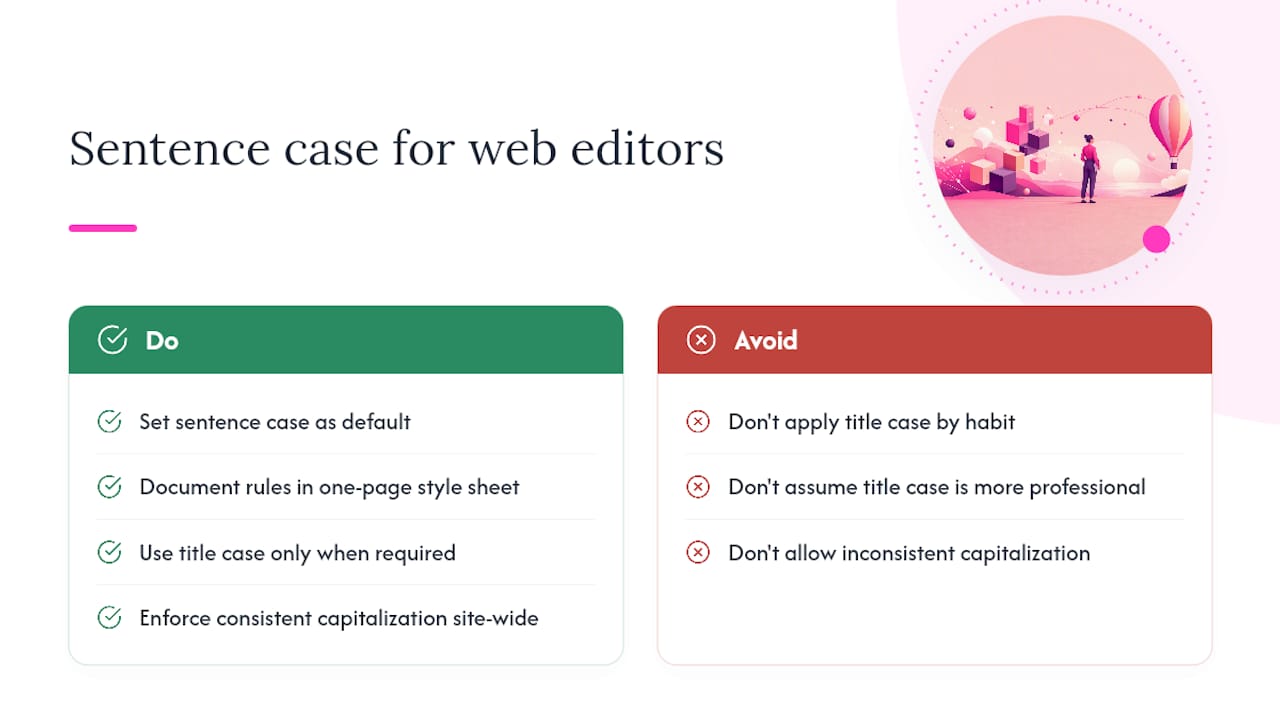
Title case has its place. Academic writing, formal reports, and book publishing have used it for generations, and there is no reason to abandon it in those contexts. The problem arises when writers apply title case to web headings out of habit or because it “looks more professional.” It does not. On a screen, a heading where every major word is capitalised creates visual noise that slows the reader down.
There is also a consistency argument that often goes unmentioned. Sentence case is easier to apply consistently because the rules are simpler. With title case, every writer on your team has to make a judgement call about whether into or across is a major word, whether the second element of a hyphenated compound gets a capital, and whether a preposition of four letters counts. Sentence case eliminates most of those decisions. The result is fewer errors and less time spent on copy-editing.
The practical recommendation: set sentence case as your default, document it in a one-page style sheet, and use title case only where a specific context genuinely requires it. Then enforce it consistently, because inconsistent capitalisation across a website undermines the professional impression you are working to create.
Websitespellchecker catches capitalisation errors before your readers do
Knowing the rules is one thing. Applying them consistently across hundreds of web pages is another challenge entirely. Websitespellchecker scans your entire site in one pass, flags inconsistent capitalisation in headings, and delivers a clear, actionable spell check report showing exactly where the problems are and what needs fixing.

The workflow is straightforward: run a scan, review the flagged headings, apply your house style consistently, and update your style sheet with any new exceptions. Websitespellchecker tracks changes over time, so you can see whether a fix held or whether the same error crept back in after a content update. For marketing professionals managing large content libraries, that scan history is particularly useful for maintaining standards across teams and across time.
There is a free tier to get started, with paid credits available for larger sites. Run your first scan at Websitespellchecker and see exactly where your heading capitalisation stands.
Authoritative style guides and tools to consult
When you need a definitive ruling on a specific capitalisation question, go to the primary source:
- APA Style — Title Case Capitalisation: the authoritative reference for academic writing; covers the four-letter rule, hyphenated compounds, and sentence case for in-paper headings
- APA Style Blog — Capitalisation: practical worked examples and clarifications on edge cases, including hyphenated words and colon usage
- Microsoft Writing Style Guide — Capitalisation: the standard reference for technical documentation, B2B SaaS content, and interface text; strongly recommends sentence case
- Grammarly — Capitalisation in Titles: a clear comparative overview of how AP, Chicago, MLA, and APA differ on prepositions, conjunctions, and word-length rules
- Websitespellchecker: for scanning entire websites to find and report capitalisation inconsistencies across all pages, with support for multi-language content and downloadable PDF reports
For hyphenation questions in medical or scientific writing, consult the relevant specialist style guide (AMA for medicine, CSE for the sciences) alongside APA, as these fields have additional naming conventions that override general title case rules.