Seven homepage copy errors quietly killing your conversions

A vague H1, “we”-centred copy, a buried call to action, hidden pricing, stray typos and placeholder text, empty jargon, and a tone that shifts from page to page. Those seven homepage copy errors are the ones that cost you trust and leads fastest, and most homepages carry at least three of them right now. Each one triggers the same reaction: the visitor stops trusting the page and self-eliminates before they reach your form.
Hidden pricing is a good example. When a homepage won’t say what things cost, CXL’s research on homepage copy shows visitors simply leave rather than dig for the answer. Typos do something similar but faster. This guide gives you the exact rewrites, a 20 to 60 minute audit checklist, and a two-step workflow (automated scan, then a human pass) that catches what manual proofreading misses. Tools like Websitespellchecker exist precisely because this class of error is so easy to overlook and so expensive to leave in place.
- Vague, feature-first H1s that never say who the page is for
- Copy written from the company’s point of view (“we”, “our”) instead of the visitor’s (“you”)
- A CTA that’s missing, buried below the fold, or unclear about what happens next
- Pricing hidden behind a “contact us” wall with no anchor figure
- Typos, placeholder (FPO) text, and inconsistent spelling left live on the page
- Jargon and vague claims that could apply to any competitor
- A tone that swings between formal and casual across sections
Key takeaways
Homepage copy converts best when the headline names the audience and outcome, the CTA is visible and specific, pricing is signalled honestly, and the page is free of typos and placeholder text.
| Point | Details |
|---|---|
| Fix the hero first | Headline and CTA affect the largest share of visitors, so test those before body copy. |
| Show a pricing signal | A “starting from” figure reduces visitors quietly leaving instead of asking for a quote. |
| Score before you fix | Use a 0 to 2 audit score across headline, CTA, proof, benefits, and pricing to prioritise the week’s work. |
| Split the workflow | Run an automated scan for typos and placeholder text, then a human pass for tone and claim strength. |
| Use Websitespellchecker to start | Its site-wide AI scan flags mechanical errors instantly, giving you a ready fix list before a human tone review. |
Table of Contents
- The seven homepage copy errors that hurt conversions most (and how to fix each one)
- How to run a 20 to 60 minute homepage copy audit
- Why automated scans catch what manual proofreading misses
- Why homepage copy fixes pay off across every channel
- Turn this audit into a fix list in minutes
- Frequently asked questions
- Sources
The seven homepage copy errors that hurt conversions most (and how to fix each one)
Each error below follows the same pattern: what’s wrong, why it costs you conversions, a rewrite template, a before and after, and a quick way to check your own homepage.
1. A headline that describes a feature instead of an outcome
A vague H1 forces the visitor to work out what you do and whether it’s for them. That’s a decision you’re asking them to make with almost no information, and most won’t bother. Good homepage copy states what you do, who it’s for, and the main outcome, ideally in 8 to 12 words.
Rewrite template: “[Product] helps [audience] [achieve outcome] without [common pain point].”
Before: “Powerful Website Management Software” After: “Catch spelling and grammar errors across your entire website before customers do”
60-second check: Cover everything except the H1. Can you tell who it’s for and what they get? If not, mark it urgent.
2. Copy written about the business, not the visitor
Count how many sentences in your hero section start with “we” versus “you”. If “we” wins, the copy is talking about your company’s achievements instead of the reader’s problem. Visitors don’t care that you’re “passionate about quality”; they care whether you’ll solve their specific issue.
Rewrite template: Replace “We provide X” with “You get X” or “X helps you do Y”.
Before: “We’ve built the most advanced scanning technology on the market.” After: “You get an AI scan of your whole site, with instant results and no manual checking.”
Verification: Highlight every “we/our” in your hero copy. If it outnumbers “you/your” three to one or worse, rewrite it today.
3. A CTA that’s missing, buried, or ambiguous
The headline and the call to action carry the largest share of your homepage traffic’s attention, which is why Twilio’s copywriting guidance recommends testing headline and CTA changes before anything else on the page. A CTA that says “Learn More” tells the visitor nothing about what happens after the click, and a CTA pushed below three scrolls of hero content might as well not exist.
Rewrite template: [Verb] + [specific outcome], e.g. “Scan your site free” rather than “Get Started”.
Before: “Learn More” (grey button, below the fold) After: “Run a free scan now” (contrasting colour, visible without scrolling)
Fast check: Load your homepage on a laptop screen without scrolling. If you can’t see a clear, specific CTA, that’s an urgent fix.
4. Pricing hidden behind a contact form
Omitting pricing information creates friction that has nothing to do with your actual price point. CXL’s analysis found that giving visitors even a “starting from” figure or a general package overview meaningfully reduces the number of people who quietly leave instead of asking.
Rewrite template: “Plans start from a clear price to reduce visitor hesitation.” or “Most customers pay between $X and $Y.”
Before: “Contact us for a custom quote.” After: “Scans start from a few cents per page, with a free tier to try first.”
Check: If your homepage requires a form submission before revealing any number at all, treat it as an urgent fix.
5. Typos, placeholder text, and inconsistent spelling
Nothing undercuts a professional homepage faster than “Lorem ipsum” text left live, a stray apostrophe in “its/it’s”, or a brand name spelled two different ways in the same paragraph. These errors are small individually, but visitors read them as a proxy for how carefully you run the rest of your business.
Rewrite template: There isn’t one. This is a find-and-fix job, not a rewrite.
Before: “Our team our dedicated to providing you’re best experience.” After: “Our team is dedicated to giving you the best experience.”
Verification: Search your homepage HTML for “lorem”, “TBD”, “TODO”, and “[insert”. Any hit is urgent.
6. Jargon and claims that could belong to any competitor
“Innovative solutions” and “best-in-class service” say nothing measurable. If you deleted your logo, could a competitor’s name sit comfortably in that same sentence? If yes, the claim isn’t differentiated enough to do any work.
Rewrite template: Replace the buzzword with a number, a name, or a specific mechanism.
Before: “We deliver innovative, best-in-class solutions.” After: “Our AI scans every page on your site in one pass and flags errors instantly.”
Check: Highlight every adjective with no number or specific mechanism attached. Three or more in the hero section is a signal to rewrite.
7. Tone that shifts between sections
A punchy, casual hero followed by stiff, formal body copy reads like two different people wrote the page, because they probably did. Inconsistent tone doesn’t just look sloppy; it makes visitors unconsciously question whether they’re still on the same brand’s site.
Rewrite template: Pick one register (formal, conversational, technical) and write a one-line style note above your homepage draft as a reminder.
Before: Hero: “Say goodbye to typos, for good!” Body: “Our proprietary methodology utilizes advanced natural language processing.” After: Hero and body both conversational: “Say goodbye to typos, for good. Our AI scans your whole site and shows you exactly what to fix.”
Check: Read the hero and the third body section back to back, aloud. If they sound like different writers, mark it for a tone pass.
Pro Tip: Read your homepage aloud, top to bottom, in one sitting. HubSpot’s copywriting research points to reading aloud, with a short break beforehand, as one of the most reliable ways to catch clumsy phrasing and tone drift that silent proofreading misses.
How to run a 20 to 60 minute homepage copy audit
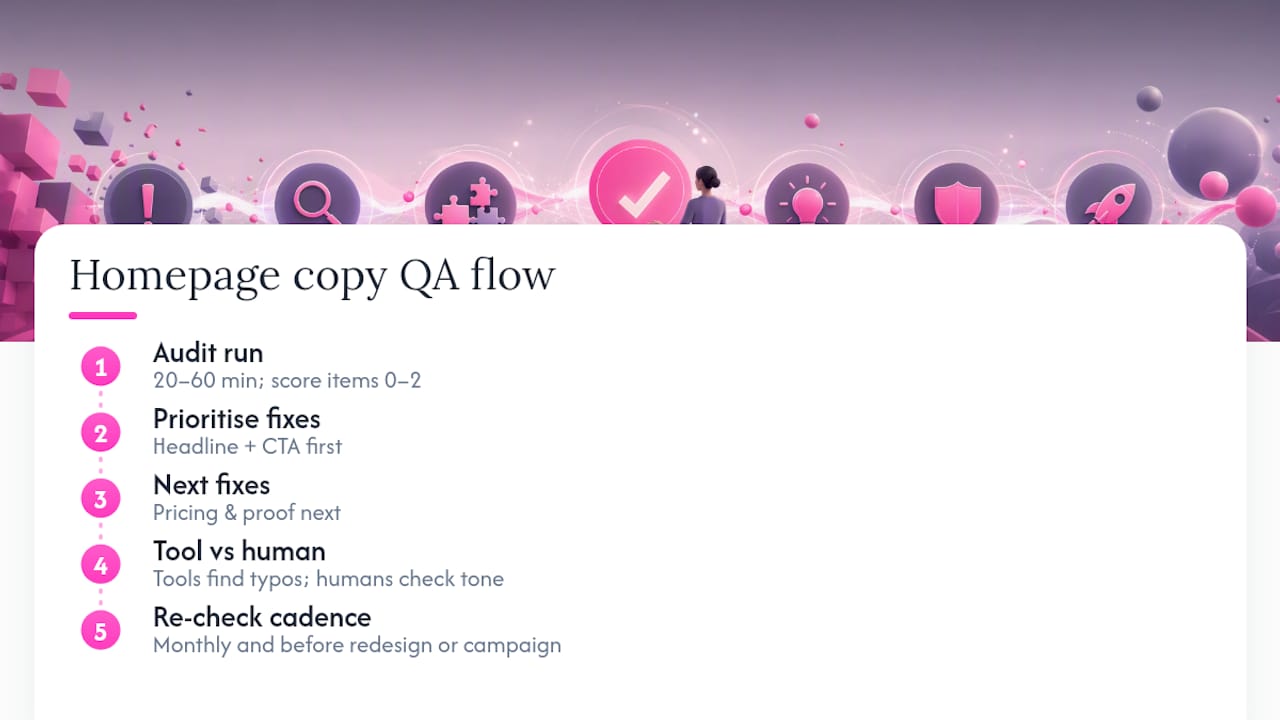
Run the checks in this order, because the earlier elements affect more of your traffic. Fixing a weak CTA matters more than polishing paragraph three.
- Headline (H1): Does it name the audience and the outcome? Score 0 (unclear), 1 (partial), or 2 (clear).
- Hero CTA: Visible without scrolling, specific verb, contrasting colour. Score 0 to 2.
- Proof elements: Testimonials, review counts, client logos, or named metrics near the fold. Score 0 to 2.
- Benefit clarity: Are claims specific and different from a competitor’s? Score 0 to 2.
- Pricing signal: Any “from” figure or package summary visible without a form. Score 0 to 2.
- Microcopy: Button labels, form hints, and error messages, checked for clarity and tone.
- Typos and formatting: Spelling, apostrophes, capitalisation, and any placeholder text.
- Mobile scan: Repeat steps 1 to 4 on a phone screen, since hero layout often breaks first there.
Add up your scores. Anything below 12 out of 16 across steps 1 to 5 means your homepage needs a fix plan within the week, starting with whichever item scored 0.
| Priority order | What to test first | Metric to watch |
|---|---|---|
| 1 | Headline wording | Bounce rate, scroll depth |
| 2 | CTA copy and placement | Click-through rate |
| 3 | Pricing visibility | Form starts vs. exits |
| 4 | Proof and benefit copy | Time on page, micro-conversions |
Test one element at a time and log the change and result before moving to the next, since a documented testing order is what makes repeat audits faster.
Why automated scans catch what manual proofreading misses
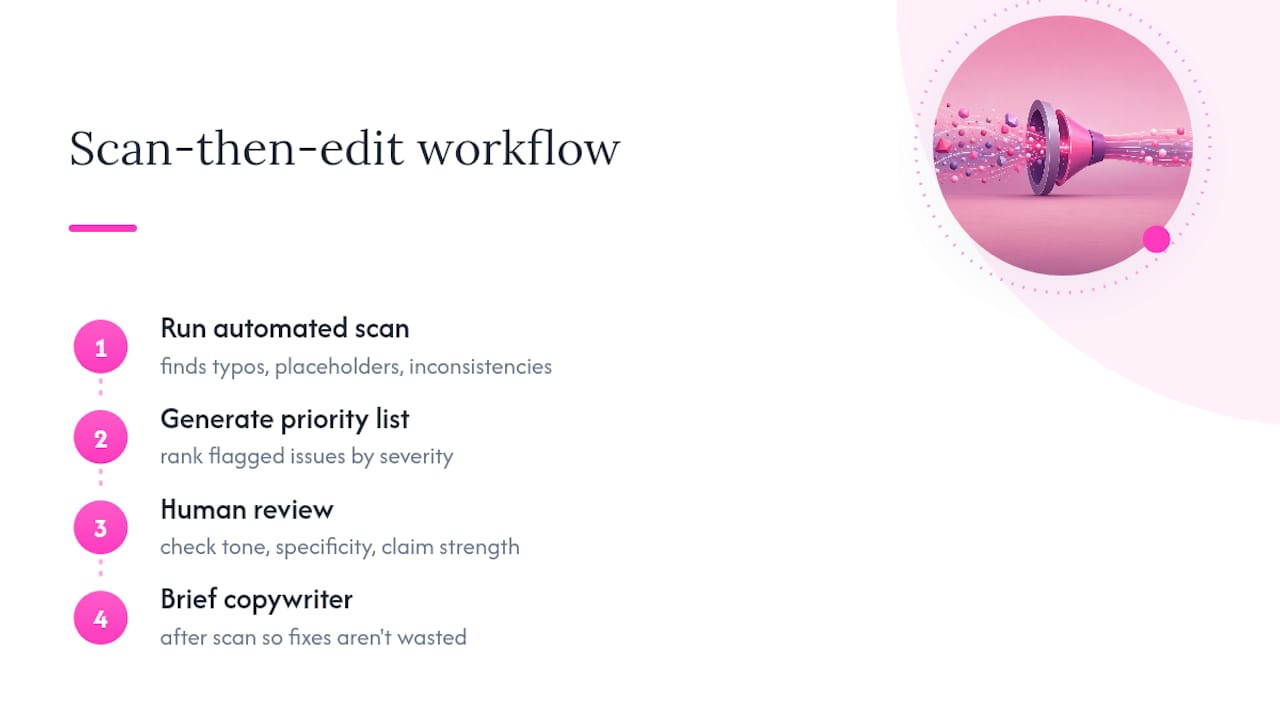
Manual proofreading is unreliable for one simple reason: you already know what your homepage is supposed to say, so your eyes skip over what’s actually there. An automated scan doesn’t have that blind spot. It reliably catches global typos, leftover placeholder or FPO text, and inconsistent spelling or capitalisation across every page on your site in one pass, not just the homepage.
What automation can’t do is judge whether your tone is consistent, whether a claim is specific enough to differentiate you, or whether your benefit copy actually lands. That judgement still needs a human pass.
The workflow that works: run the scan, generate a prioritised error list, then have someone on your team review the flagged sections specifically for tone and claim strength. Websitespellchecker’s scanning approach was built around exactly this gap, catching the mechanical errors instantly while leaving room for a human editor to handle the parts that need judgement.
Pro Tip: Run your scan before you brief a copywriter on tone fixes. There’s no point polishing a sentence that’s about to be flagged as a duplicate or a spelling inconsistency anyway.
Why homepage copy fixes pay off across every channel
Your homepage hero, the headline, subheadline, CTA and proof together, works as one conversion unit. Fix it once and the benefit compounds: paid traffic converts better because the landing experience finally matches the ad promise, organic visitors trust the page faster, and sales calls start from a clearer starting point because prospects already understand what you do.
Assign ownership clearly. Marketing owns headline and CTA testing, a content editor owns tone and proof, and whoever ships the site owns the typo and formatting pass before launch. Run a full scan monthly, and always sign off copy again before any homepage redesign goes live.
Turn this audit into a fix list in minutes
You’ve just read through seven common homepage copy errors and audited your own page by hand. The faster route is to let an AI scan do the mechanical half of that work for you: Websitespellchecker checks every page on your site in one pass, spots typos, leftover placeholder text, and inconsistent spelling instantly, and tracks changes over time so you can see what’s been fixed and what’s still outstanding.

Run a free scan, export the flagged list, and match each item against the severity scores from your audit checklist above. That gives you a ready-made 1 week fix plan without spending an afternoon proofreading manually. If you’re a business owner looking to tidy up your site before a launch or a seasonal push, start with the free homepage scan for business owners and work down your priority list from there.
Frequently asked questions
What are the most common homepage copy errors? The most damaging are a vague headline, "we"focused copy instead of "you"focused copy, a missing or buried CTA, hidden pricing, live typos or placeholder text, empty jargon, and inconsistent tone across sections.
How long should a homepage copy audit take? A prioritised audit covering headline, CTA, proof, pricing, and typos takes 20 to 60 minutes using a simple 0 to 2 severity score per item, enough to build a one week fix plan.
Should I fix the headline or the pricing section first? Fix the headline and CTA first, since they affect the largest share of your traffic; pricing and proof elements matter next because they influence whether visitors act once they understand the offer.
Can automated tools catch tone and messaging problems? No. Automated scanning reliably finds typos, placeholder text, and inconsistent spelling or capitalisation, but tone, claim specificity, and differentiation still need a human editorial pass.
How often should I re-check my homepage copy? Run a full scan monthly and always re-check copy before any homepage redesign or major campaign launch, since new pages and edits reintroduce errors quickly.
Sources
For deeper guidance beyond this audit: Shopify’s website copywriting guide, CXL on pricing friction, Twilio’s rules for website copy, HubSpot’s copywriting tips, and Search Engine Journal on copy structure. For SEO-related content pitfalls specifically, SemLocal’s guide to low-effort content mistakes is worth a read.