How to proofread your own writing: a practical guide

What does effective self-proofreading actually involve?
Proofreading your own writing effectively comes down to one core principle: never try to catch every type of error in a single read. The most reliable approach is a multi-pass proofreading process that separates structural editing, sentence clarity, and mechanical accuracy into distinct passes. Attempting to spot grammar, flow, and structural flaws all at once splits your attention and reduces how many errors you actually catch.
The other non-negotiable? Distance. Leaving a draft for at least 30 minutes before you start reviewing it gives your brain enough separation to read what is actually on the page, not what you intended to write. Ideally, sleep on it.
Here are the core principles to keep in mind before you begin:
- Focus on one error type per pass (structure, then clarity, then spelling and punctuation)
- Read aloud or use text-to-speech to catch phrasing errors your eyes skip
- Print the draft or change the font to break your brain’s auto-correction habits
- Take deliberate breaks between passes to stay mentally fresh
- Build a personal checklist of the mistakes you make most often
- Use an AI tool as a final verification layer, not a replacement for manual reading, leveraging innovative digital proofreading and editing features for optimal results
How to follow a multi-pass proofreading process
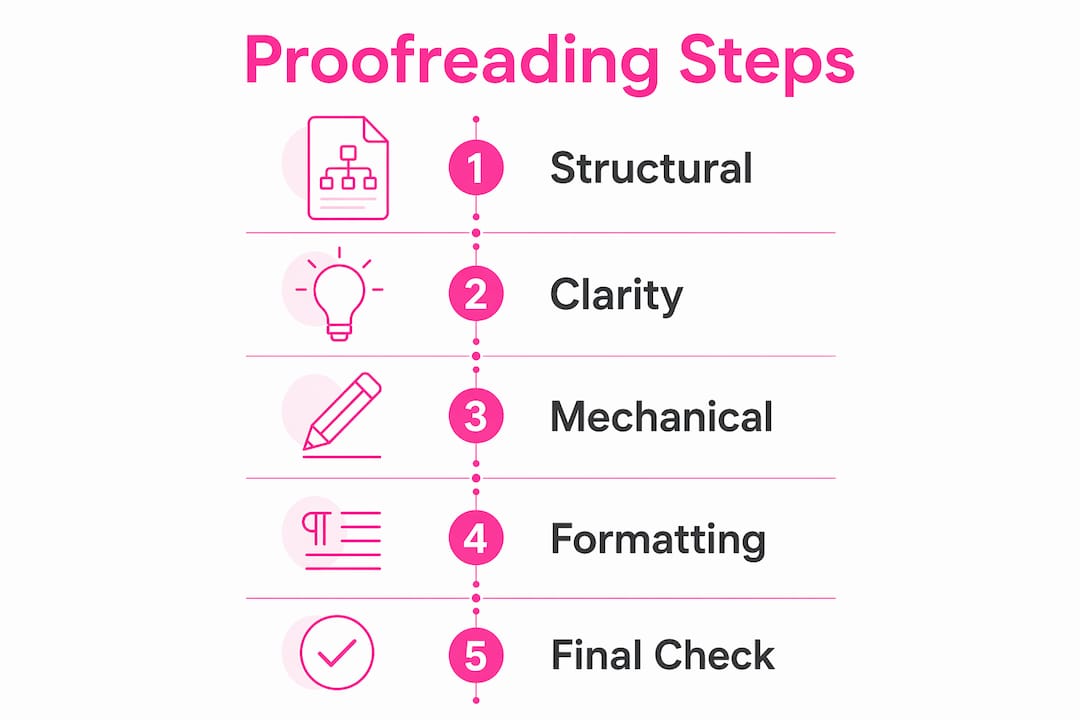
The three-pass method is the most practical structure for editing your own writing. Each pass has a specific job, and keeping them separate is what makes the whole process work.
-
Structural pass. Read the whole piece for logic and flow. Ask whether each paragraph earns its place, whether the argument builds clearly, and whether anything is missing or repeated. Do not stop to fix commas. That is not this pass’s job.
-
Clarity pass. Go sentence by sentence. Look for awkward phrasing, vague words, overly long sentences, and ideas that need more context. Reading aloud works particularly well here because you will naturally pause at anything that sounds off.
-
Mechanical pass. This is the final proofreading stage, focused entirely on spelling, grammar, and punctuation. Professional writing centres recommend concentrating on one error type at a time because it is far easier to catch grammar errors when you are not simultaneously hunting for typos.
-
Take a break between passes. Even a short rest helps. A 10-minute break provides some distance, but longer intervals, up to two days, produce a noticeably fresher perspective.
-
Final tool check. Run your text through an AI-powered tool as a last sweep. This catches anything your eyes have grown blind to after multiple reads.
The order matters. There is no point perfecting a sentence that you later cut during the structural pass.

How do you catch errors you keep missing?
Your brain is working against you here. It automatically fills in what you meant to write, which is why you can read the same paragraph five times and miss the same typo every time. The solution is to introduce friction that forces your brain to slow down and read what is actually there.
- Read backwards, word by word. Starting from the last word and working towards the beginning is particularly effective for spelling errors because it completely removes sentence context. Your brain cannot predict the next word, so it has to look at each one individually.
- Isolate each sentence. Use a ruler or a folded piece of paper to cover everything except the line you are reading. This works on screen too: press return after each full stop so every sentence sits on its own line.
- Change the document’s appearance. Altering the font, size, or colour of your text tricks your brain into treating it as unfamiliar, which slows down autopilot reading and makes errors more visible.
- Use text-to-speech. Hearing your words read back forces you to process the actual text rather than your memory of it. Homophones like “their” and “there” become obvious the moment they are spoken in the wrong context.
- Circle every punctuation mark. It sounds tedious, but it forces you to examine each one rather than skim past it.
Pro Tip: Print your draft and read it with a coloured pen in hand. Using printed copies with physical proofreading marks helps you visualise corrections more clearly than working on screen alone, and the change of medium slows your reading speed naturally.
How to stay focused during a proofreading session
Proofreading in long, unbroken stretches is one of the most reliable ways to miss errors. Concentration fades quickly when you are reading your own familiar text, and fatigue causes the very mistakes you are trying to catch. Short, focused sessions with deliberate breaks between them produce better results than a single marathon read.
Practical ways to keep your sessions sharp:
- Work in a quiet space with notifications off. Distractions do not just interrupt you; they reset your reading focus entirely.
- Set a timer for a short session, then step away before returning to the next pass.
- Proofread at a time of day when your concentration is naturally higher, typically morning for most people.
- Build a personalised proofreading checklist based on your own habitual errors. If you consistently confuse “affect” and “effect,” or drop the Oxford comma, put those at the top of your list.
- Split long documents into sections and treat each one as a separate task.
A personal checklist does more than keep you organised. Over time, it teaches you to recognise your own patterns, which means you start catching those errors earlier in the drafting process.
How Websitespellchecker helps you proofread more thoroughly
Manual proofreading is thorough but has real limits, particularly when you are reviewing large volumes of text or content spread across multiple web pages. Automated spelling and grammar checkers often miss homophones and context-dependent mistakes, which is why the best approach combines manual passes with a capable AI tool.
Websitespellchecker uses AI scanning technology to check entire websites for spelling mistakes, grammatical errors, awkward phrasing, missing words, and inconsistent usage in one go. For writers managing web content, that means errors across dozens of pages get flagged in a single scan rather than requiring page-by-page manual review.
Key features relevant to independent writers and content creators:
- Whole-site scanning that catches errors across every page simultaneously
- Scan history tracking so you can see whether errors have been introduced since your last check
- Detailed, downloadable PDF reports with specific error locations and suggested fixes
- Multi-language support for writers working across more than one language
- Bespoke scan configuration to focus on the error types most relevant to your content
AI tools fit naturally into the final verification step of a multi-pass routine. You complete your manual passes first, then run a tool scan to catch anything that slipped through. For a broader look at AI proofreading options available in 2026, there are several worth comparing depending on your workflow.
One thing to keep in mind: even the best AI tool will not replace the structural and clarity passes you do yourself. It catches surface errors with speed and consistency, but it cannot tell you whether your argument makes sense or whether a sentence is genuinely clear. That judgement still belongs to you.
Tips for formatting and consistency checks
Formatting errors are easy to overlook because they do not read as “wrong” the way a misspelled word does. Your eye accepts them as normal. A heading that uses title case on one page and sentence case on another, or a font size that shifts unexpectedly mid-document, chips away at the professional impression your writing makes.
Run a dedicated formatting pass after your mechanical proofreading. Check that heading levels are applied consistently throughout, that font styles and sizes match your intended structure, and that spacing between paragraphs is uniform. If you are working to a style guide, keep it open alongside your document and verify each formatting element against it directly.
Consistency in terminology matters just as much. If you refer to a product as “the dashboard” in one section and “the control panel” in another, readers notice, even if they cannot immediately explain why the text feels slightly off. Pick one term and use it throughout. The same applies to number formatting: decide whether you are writing “10%” or “10 per cent” and stick to it from the first page to the last.
Why reviewing layout and citations deserves its own pass
Layout and citations are the two areas writers most often rush through, usually because they feel like administrative tasks rather than writing. That is a mistake. A citation error in an academic paper or a professional report carries real consequences, from undermined credibility to accusations of plagiarism.
Check each citation individually against your chosen style guide, whether that is MHRA, APA, or Chicago. Verify the spelling of authors’ names, the accuracy of publication dates, and that every in-text citation has a corresponding entry in your reference list. Oregon State University’s Writing Center recommends checking each citation separately rather than reviewing the reference list as a block, because errors in individual entries are far easier to spot in isolation.
For layout, work through a checklist: margins, heading hierarchy, page numbering, image captions, and table labels. If you submitted to a brief or a template, compare your document against the original requirements line by line. It takes five minutes and regularly catches the kind of oversight that would otherwise only surface after submission.
Try Websitespellchecker on your website content

If your writing lives on a website, manual proofreading alone will not keep pace with how quickly content changes. Websitespellchecker scans your entire site for spelling mistakes, grammar errors, and formatting inconsistencies in one pass, then delivers a clear, shareable report with every issue flagged and located.
It fits directly into the final step of the multi-pass routine described in this guide: do your structural and clarity passes manually, then let Websitespellchecker handle the surface-level sweep across every page at once. For marketing professionals and content creators who publish regularly, that combination keeps quality consistent without adding hours to your workflow.
Start a free scan and see what your website looks like through a fresh pair of eyes.
Key takeaways
Effective self-proofreading requires separating structural editing, sentence clarity, and mechanical accuracy into distinct passes, supported by deliberate breaks and a final AI-assisted check.
| Point | Details |
|---|---|
| Use a multi-pass approach | Separate structural, clarity, and mechanical passes to avoid splitting cognitive attention. |
| Take breaks between passes | Leaving a draft for at least 30 minutes, ideally longer, significantly improves error detection. |
| Introduce reading friction | Reading backwards, isolating sentences, or changing the font slows autopilot reading and surfaces errors. |
| Build a personal checklist | Tracking your habitual mistakes focuses each pass and improves accuracy over time. |
| Use AI as a final layer | Websitespellchecker scans entire websites for surface errors after manual passes are complete. |