List punctuation rules: the complete UK guide

Clarity and consistency are the two rules that override every other list punctuation decision. Get those right and the rest follows naturally. Here is what that looks like in practice:
- Use a colon after a complete sentence lead-in. If the words before your list form a full sentence, end them with a colon.
- Match end punctuation to list type. Full stops for sentence items; nothing for short fragments.
- Use the serial (Oxford) comma only when omission creates ambiguity. In UK usage, it is optional in simple lists.
- Keep items grammatically parallel. All noun phrases, all verb phrases, or all full sentences — never a mix.
- Minimise extraneous punctuation in online lists. Fewer stray marks means cleaner screen-reader output.
Fragment list (no end punctuation): Sentence list (full stops required):
Key takeaways
Correct list punctuation comes down to one principle: match your punctuation to your list type, apply it consistently, and let clarity override convention when the two conflict.
| Point | Details |
|---|---|
| Colon after sentence lead-ins | Always end a complete sentence lead-in with a colon before your list begins. |
| Full stops for sentence items only | Fragment lists need no end punctuation; sentence lists need a full stop after every item. |
| Oxford comma for clarity | In UK usage, use the serial comma only when omitting it creates ambiguity. |
| Parallel structure throughout | Every item must share the same grammatical form — noun phrases, verb phrases, or full sentences. |
| Websitespellchecker for site-wide checks | Automated scanning surfaces end-punctuation mismatches and inconsistencies across all published pages. |
Table of Contents
- What list type do you have, and how does that shape your lead-in?
- When do list items need a full stop, semicolon, or nothing at all?
- Do list items need capital letters, and how do you fix non-parallel items?
- Should you use the Oxford comma in UK English?
- How does punctuation in lists affect screen readers and accessibility?
- How do you punctuate nested lists and inline lists?
- Which tools help you check list punctuation at scale?
- Quick-reference checklist for everyday list punctuation
- Why consistency matters more than which rule you pick
- Catch punctuation inconsistencies across your whole site
- Sources
What list type do you have, and how does that shape your lead-in?
Before you write a single bullet, identify which of three list types you are working with. That choice determines punctuation, capitalisation, and how you phrase the lead-in.
Sentence lead-in: The words before the list form a grammatically complete sentence. End them with a colon. Each list item then reads as a continuation or expansion of that sentence.
Phrase lead-in: The lead-in is an incomplete phrase that the list items complete. A colon still usually follows, but the items must each complete the sentence grammatically. This is where awkward phrasing examples tend to cluster — writers start with “The benefits include:” and then write items that do not follow grammatically from that opener.
Stand-alone list: No lead-in at all. The list has a heading above it, or the context makes the subject obvious. Items are treated as fragments and carry no end punctuation.
The ONS service manual distinguishes sentence and phrase lead-ins explicitly and advises writers to choose one treatment and apply it consistently across a document.
Pro Tip: When your lead-in feels awkward, convert it to a complete sentence and add a colon. That single change resolves most capitalisation and end-punctuation questions in one move.
When do list items need a full stop, semicolon, or nothing at all?
The direct answer: end each item with a full stop when it is a complete sentence, use nothing for short fragments, and reach for semicolons only when items contain internal commas or are complex clauses. The University of Edinburgh editorial style guide puts it plainly — full stops after complete-sentence items, no end punctuation for simple fragments, and consistency throughout.
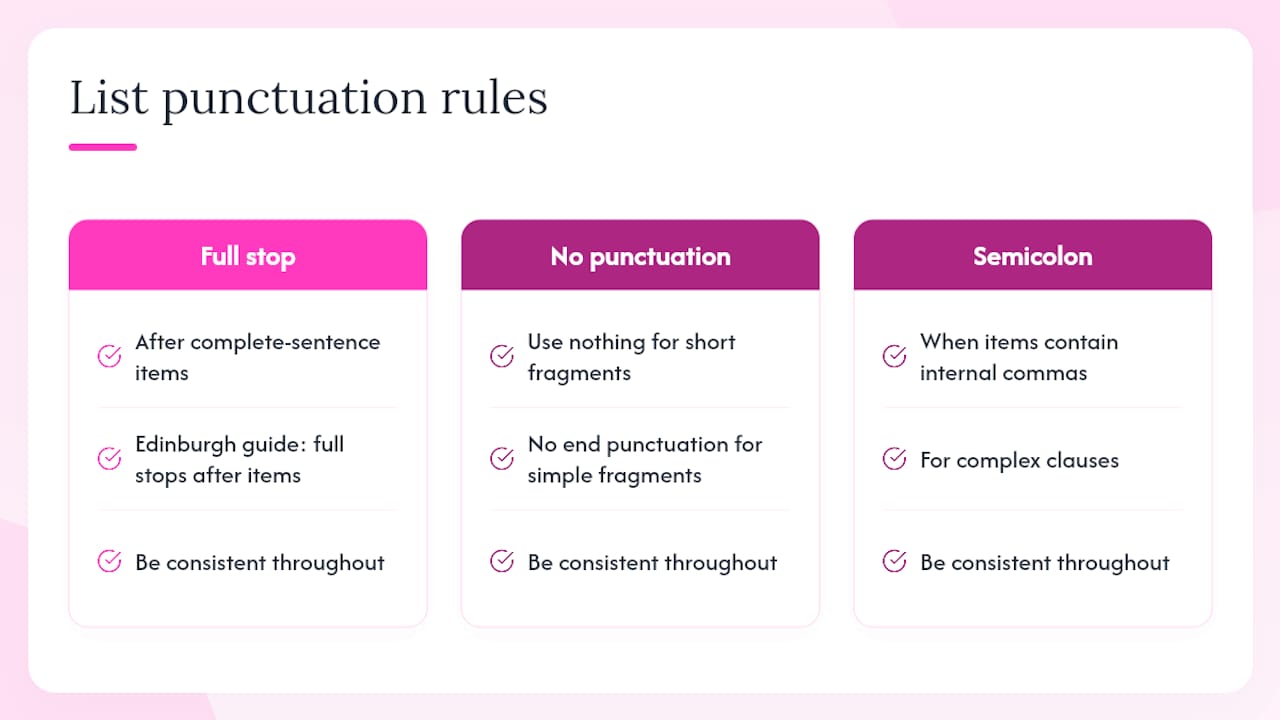
Sentence lists
Each item is a standalone sentence. Capitalise the first word and close with a full stop.
Before: After:
Fragment lists
Items are short phrases that complete the lead-in or stand alone as labels. No end punctuation.
Numbered step lists
Step-by-step numbered lists behave like sentence lists. Each step is a complete instruction, so capitalise and close with a full stop:
- Open the settings panel.
- Select your preferred language.
- Save and restart the application.
When semicolons are the right call
Use semicolons when items contain internal commas and would otherwise be ambiguous. The Hull University Libraries grammar resource confirms that semicolons separate complex list items where commas already appear inside the items.
Example requiring semicolons:
Conjunctions and legal phrasing
The ONS service manual advises against adding “and” or “or” after bullet points unless legal clarity demands it. In a standard editorial list, drop the conjunction. In a contract or regulatory document, “and” or “or” before the final item signals whether all conditions apply or just one.
Do list items need capital letters, and how do you fix non-parallel items?
Use sentence case for list items in most formal documents: capitalise the first word of each item and nothing else (unless a proper noun appears). Initial capitals on every word are a stylistic choice some house styles make, but they add visual noise without aiding comprehension. Whatever you choose, apply it without exception across the document. The University of Edinburgh style guide reinforces that capitalisation and punctuation rules for vertical lists must be applied consistently.
Parallel structure matters more than most writers realise. A list where one item is a noun phrase, the next is a gerund, and the third is a full sentence forces readers to recalibrate with every bullet. Northwestern University’s Writing Place notes that awkward sentence examples in lists almost always trace back to mixed grammatical forms.
Checking parallelism — a quick editor’s method:
- Read each item aloud after the lead-in verb. If any item sounds wrong, it is not parallel.
- Swap the lead-in for “to” and read again. Every item should work as an infinitive phrase.
- If items mix tenses or parts of speech, rewrite the outliers to match the dominant form.
Non-parallel (awkward phrasing example): Parallel: Pro Tip: Add a one-line parallelism test to your editorial checklist: “Does every item complete the lead-in grammatically?” If any item fails, rewrite it before publishing.
Should you use the Oxford comma in UK English?
In UK usage, the serial comma (also called the Oxford comma or listing comma) is optional in simple lists. The Office for National Statistics style guide is clear: pick one convention and maintain it across the entire document, and use the serial comma whenever its omission would create ambiguity. The University of Sussex punctuation guide echoes this — include the listing comma when it clarifies meaning, omit it when the list is unambiguous.
The ambiguity test is the practical rule. Compare:
Ambiguous without the serial comma:
The report was reviewed by the editor, the legal team and the CEO and CFO.
Who reviewed it? The CEO and CFO together, or is “the CEO and CFO” a single entity? Add the serial comma:
Clear with the serial comma:
The report was reviewed by the editor, the legal team, and the CEO and CFO.
When rewording is cleaner than toggling the comma, rewrite. “The report was reviewed by four parties: the editor, the legal team, the CEO, and the CFO” removes the ambiguity entirely and reads more naturally.
Handling internal punctuation inside items
When list items themselves contain commas, the list-level comma loses its separating power. Switch to semicolons at item level, or rephrase to remove the internal commas.
Comma-heavy items (hard to read):
The project requires input from design, UX, development, front-end and back-end, and QA, testing.
Semicolons restore clarity: Pro Tip: If your list items contain internal conjunctions or commas, semicolons or a rephrased structure will almost always serve readers better than adding more commas.
How does punctuation in lists affect screen readers and accessibility?
Minimise extraneous end punctuation in short online lists. That is the accessibility-first position, and it is backed by WCAG guidance from W3C WAI, which advises structuring content so assistive technologies can parse it without friction. Stray semicolons, trailing commas, and inconsistent full stops all create unnecessary noise for screen-reader users.
Sentence lists are the exception: correct end punctuation actually helps screen readers signal the end of a complete thought. The problem is extraneous punctuation on fragment lists — a full stop after a one-word label, for instance, adds a pause that confuses rather than clarifies.
The Australian Government Style Manual recommends minimal punctuation for bullet and numbered lists as a baseline, a position that aligns with UK government digital guidance and supports usability for diverse audiences.
Accessibility checklist for online lists:
- Write a clear, descriptive lead-in so screen readers announce the list’s purpose.
- Use consistent punctuation within each list — never mix full stops and no punctuation across items.
- Avoid mixing list types (sentence items and fragment items) within a single list.
- Do not end items with “etc.” — it is ambiguous for all readers and particularly unhelpful for screen readers.
- Use semantic HTML list elements (
<ul>,<ol>,<li>) so ARIA roles are assigned correctly. - Keep nesting to two levels at most; deep nesting degrades both visual and auditory comprehension.
For WordPress publishers, a dedicated WordPress accessibility checker can flag list-formatting issues that affect WCAG compliance before content goes live. More broadly, understanding how website accessibility checkers work helps you choose the right tool for your publishing environment.
How do you punctuate nested lists and inline lists?
A level-one sentence list uses full stops; a level-two fragment list under it uses no end punctuation. Do not let the parent list’s rules bleed into the child list.
Multi-level example: Level one items here are fragments (no full stops). Level two items are sub-fragments (no full stops). If level one items were full sentences, they would each carry a full stop, but the sub-list would still follow its own fragment rules.
Inline lists inside running text
Grammarist’s guidance on listing in sentences confirms that commas separate elements in a sentence list, colons introduce vertical lists following a complete sentence, and semicolons handle complex inline items. When an inline list grows beyond three or four items, or when items contain commas, convert it to a vertical list.
Manageable inline list:
The package includes a scan report, a summary PDF, and a change-history log.
Too complex for inline — convert to vertical: Pro Tip: Prefer a vertical list over deep nesting whenever you have more than two sub-levels. Deep nesting is harder to scan visually and harder for screen readers to announce clearly.
Which tools help you check list punctuation at scale?
Combine automated scans with a short manual checklist. No tool catches every parallelism problem or ambiguous Oxford comma — but the right combination catches the patterns that slip through human review, especially across large sites with dozens of pages.
Practical tool categories and their uses:
- Grammar checkers (such as LanguageTool or the grammar layer in Microsoft Word): catch obvious end-punctuation inconsistencies and flag sentence fragments that may be unintentional.
- Document linters and CMS plugins: enforce house-style rules at the point of authoring, before content reaches a reviewer.
- Website scanners: scan entire sites for spelling, grammar, and formatting inconsistencies across all published pages — useful when list-punctuation rules have changed and you need to audit existing content. A spell check report from a site-wide scanner surfaces these issues in a single downloadable document.
- Readability tools: flag overly long list items and suggest where a sentence list should be broken into shorter fragments.
A simple editorial workflow:
- Run an automated scan to catch spelling errors, missing full stops on sentence items, and obvious inconsistencies.
- Fix serial/parallel problems flagged by the grammar checker.
- Human-proofread for clarity, Oxford comma decisions, and accessibility.
- Run a final style-consistency check against your house style guide.
Pro Tip: Add your list-punctuation rules to your house style guide as a one-page example sheet. Teams follow examples far more reliably than abstract rules — a before/after pair for each list type takes ten minutes to write and saves hours of back-and-forth in review.
Automated tools help, but they do not replace editorial judgement. A scanner will not tell you whether a semicolon-separated list would read better as a rephrased fragment list. That call belongs to the editor. For a broader view of website quality assurance tools and how they fit into a publishing workflow, the options range from lightweight grammar checkers to full site-crawl platforms.
Quick-reference checklist for everyday list punctuation
The rules below are designed to be copied into a style guide or printed for the editorial desk.
Numbered checklist:
- Lead-in punctuation: Use a colon after a complete sentence lead-in. Use a colon after a phrase lead-in. Use no punctuation after a heading-only lead-in.
- End punctuation — sentence lists: Full stop after every item. Capitalise the first word of each item.
- End punctuation — fragment lists: No end punctuation. Capitalise the first word of each item.
- Capitalisation: Sentence case throughout unless house style specifies otherwise. Apply consistently.
- Oxford comma: Omit in simple UK lists. Include when omission creates ambiguity. Pick one approach and keep it.
- Internal punctuation: Use semicolons when items contain commas. Prefer rephrasing when items become complex.
- Nested lists: Apply each level’s own punctuation rules independently. Limit nesting to two levels.
- Accessibility: No extraneous punctuation on fragment items. Use semantic HTML list elements. Avoid “etc.”
Before/after examples — the most common fixes:
| Problem | Before | After |
|---|---|---|
| Missing colon after sentence lead-in | “The report covers three areas” followed by bullets | “The report covers three areas:” followed by bullets |
| Full stops on fragment list | “- budget.” / “- timeline.” | “- budget” / “- timeline” |
| Non-parallel items | “- reduce errors” / “- faster publishing” | “- reduce errors” / “- publish faster” |
| Ambiguous serial comma | “the editor, legal and CEO and CFO” | “the editor, legal, and CEO and CFO” |
| Complex items needing semicolons | “- Edinburgh, Scotland,” | “- Edinburgh, Scotland;” |
Why consistency matters more than which rule you pick
The debate over Oxford commas and colon placement is real, but it is also a distraction. The editorial decision that actually protects your readers is the one you make once and apply everywhere. A document that uses full stops on fragment lists in section one and drops them in section three does not just look careless — it signals to readers that no one is in charge of the content.
The clarity-first principle cuts through most house-style disagreements. When a rule produces an ambiguous or awkward result, override it and rephrase. No style guide is more important than a sentence your reader can understand without rereading.
For teams, the most practical move is a short internal memo with one example of each list type, not a ten-page rulebook. Show writers what a correct sentence list looks like next to a correct fragment list, and compliance follows naturally. The Oxford comma question can be settled in a single sentence: “Use it when omission creates ambiguity; omit it otherwise.” That is a rule any writer can apply without consulting a guide mid-draft.
Catch punctuation inconsistencies across your whole site
Manual proofreading catches most list-punctuation problems in a single document. Across a website with hundreds of pages, it misses more than it finds. Websitespellchecker scans your entire site in one go, flagging spelling errors, grammatical inconsistencies, and formatting problems — including the kind of end-punctuation mismatches and awkward phrasing that accumulate quietly across published content.

For content managers and editorial teams, the practical benefits are straightforward: you get a detailed, downloadable report covering every page, you can track changes over time, and you can share results with the wider team without running the scan again. Automation handles the pattern-matching; your editors handle the judgement calls.
Start your free scan and see exactly where your site’s list punctuation and wider content quality stand. Automated scanning complements editorial review — it does not replace it.
Sources
The rules in this guide draw on authoritative style manuals and accessibility standards. Each source below is worth adding to your own editorial reference shelf.