How to prevent repeated mistakes on your website

The fastest way to prevent repeated website spelling and grammar mistakes is to run an automated, site-wide AI scan and pair it with a cross-functional QA workflow that enforces pre-publish checks. Manual proofreading alone misses errors at scale. A structured prevention system gives you four immediate benefits:
- Catch errors site-wide in one scan rather than page by page
- Reduce repeat mistakes by building fixes into your publishing workflow
- Save editor time with automated detection and triage queues
- Protect trust and SEO before errors reach live pages
Run a free 50-page scan with Websitespellchecker now and get instant results plus a downloadable PDF report.
Key takeaways
A site-wide automated scan combined with a named owner and pre-deploy gates is the most reliable way to prevent repeated website spelling and grammar errors from reaching live pages.
| Point | Details |
|---|---|
| Run a baseline scan first | Scan your full site before making any changes so you have a quantified error count to measure against. |
| Assign a named owner | Without a website quality manager, errors persist; BCG’s research confirms cross-functional ownership is what makes quality sustainable. |
| Gate every publish | A pre-deploy check that blocks publication on high-severity errors stops regressions before they reach visitors. |
| Track error rate trends | Monitor errors per 1,000 pages monthly; a rising repeat error rate signals a process gap, not just a content problem. |
| Websitespellchecker as your starting point | The free 50-page scan gives you an instant baseline report and scan history to track improvement over time. |
Table of Contents
- Why do spelling errors keep damaging your site’s credibility?
- What does a prevention system that actually works look like?
- How do you implement the prevention plan in five steps?
- How do you connect automated scans to your CMS and CI/CD pipeline?
- What metrics tell you whether prevention is working?
- What pre-deploy checks stop the same errors coming back?
- What does a governance policy for your team look like?
- How does Websitespellchecker help you prevent repeated mistakes?
- What security and privacy checks should you do before scanning?
- Prevention is a marketing investment, not just a technical task
- Your free 50-page scan is ready to run
- Sources
Why do spelling errors keep damaging your site’s credibility?
A single typo on your homepage does more damage than most teams realize. Stanford’s credibility guidelines note that typographical errors and broken links erode perceived trust far more than teams expect, because visitors infer broader carelessness from a single visible mistake.
TrustedSite’s 2026 ecommerce trust research found that 59% of shoppers say typos and grammatical errors reduce their trust in a site. That figure translates directly into lost conversions, higher bounce rates, and reduced ad click-through rates when landing pages contain errors.
Organic visibility suffers too. Search engines factor engagement signals into rankings, and pages that drive quick exits because of poor content quality tend to rank lower over time.
What does a prevention system that actually works look like?
The answer is a continuous loop: detect → triage → fix → measure. Each component has a clear owner and cadence, so errors are caught before they reach live pages and fixed before they recur.
| Component | What it does | Owner | Cadence |
|---|---|---|---|
| AI site scanner | Crawls all public pages and flags spelling, grammar, and formatting errors | Content ops / DevOps | Weekly or on every deploy |
| Triage queue | Prioritises flagged errors by severity and page importance | Content manager | Within 48 hours of scan |
| Ticketing and ownership | Assigns fixes to named individuals with a due date | Website quality manager | Per triage session |
| Pre-deploy gate | Blocks publish if scan finds high-severity errors | Developer / DevOps | Every branch merge or publish |
| Monitoring dashboard | Tracks error rate trends and scan coverage over time | Marketing / content ops | Monthly review |
BCG’s analysis of website quality found that most organisations lack exactly this kind of coordinated, cross-functional mechanism, and that problems persist indefinitely when no named owner exists. Pairing tool output with a short SLA, such as 48 hours to resolve high-severity issues, is what makes automation stick.
How do you implement the prevention plan in five steps?
Set up the full prevention loop in a single sprint. Here is the checklist:
-
Run a baseline scan (Day 1, owned by content manager). Scan your entire site and export the PDF report. This gives you a quantified starting point: total errors, pages affected, and severity distribution. Done when: baseline scan is complete and report is saved.
-
Triage and assign owners (Days 2–3, owned by website quality manager). Sort errors by severity and page priority. Assign each item to a named person with a resolution deadline. Done when: triage backlog has fewer than 10 unassigned high-severity items.
-
Set pre-publish gates (Days 3–5, owned by developer). Configure your CMS or deployment pipeline to run a scan before any page goes live. Done when: a test publish with a known error is blocked by the gate.
-
Integrate scans with CI/CD and CMS (Week 2, owned by DevOps). Add a scan job to your CI pipeline so every pull request or branch merge triggers a check. Connect scan results to your ticketing tool (Jira, Trello, or Linear) so issues are created automatically. See the website quality assurance tools guide for integration patterns. Done when: a CI job fails on a branch containing a deliberate error.
-
Monitor trends and iterate (Ongoing, owned by marketing). Review the monitoring dashboard monthly. Track whether your error rate per 1,000 pages is falling. Adjust scan configuration and training as needed. Done when: three consecutive monthly scans show a declining error rate.
How do you connect automated scans to your CMS and CI/CD pipeline?
Integration keeps errors out of production by building scans into pipelines your team already uses, rather than adding a separate manual step.
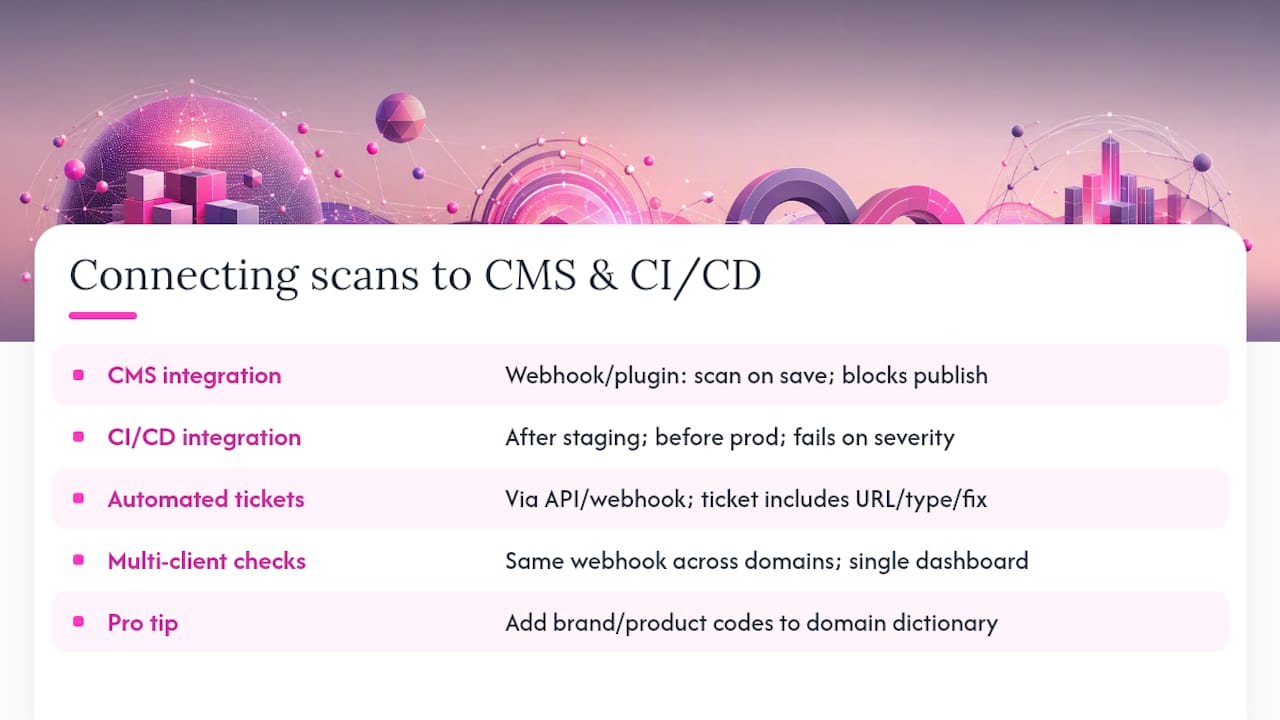
CMS integration works via webhook or plugin. When a content author saves or schedules a page, a webhook fires a scan of that URL. If the scan returns high-severity errors, the publish action is blocked and the author sees a list of issues to fix before proceeding.
CI/CD integration runs a scan as part of your build job. Place the scan step after your staging deploy and before your production deploy. If the scanner returns errors above your severity threshold, the pipeline fails and the deploy is halted. This approach works with GitHub Actions, GitLab CI, Jenkins, and most other pipeline tools.
Automated ticket creation connects scan output to Jira or Trello via the scanner’s API or webhook. Each new error generates a ticket with the URL, error type, and suggested fix, so nothing falls through the cracks.
For teams using automated client website checks, the same webhook pattern applies across multiple client domains from a single dashboard.
Pro Tip: Configure your domain dictionary before running scans in a development environment. Add brand names, product codes, and technical acronyms to the ignore list so spell checker false positives do not flood your triage queue with noise during active development.
What metrics tell you whether prevention is working?
Lead with these five metrics. They give you an honest picture of whether your system is reducing errors or just detecting them.
| Metric | Definition | Target | Alert threshold |
|---|---|---|---|
| Error rate per 1,000 pages | Total errors divided by pages scanned, multiplied by 1,000 | Declining month-on-month | Any month-on-month increase |
| Pages scanned | Number of pages covered by each scan run | all public pages | low coverage |
| Time-to-fix | Average hours from error detected to error resolved | Under 48 hours for high severity | Over 72 hours |
| Repeat error rate | Errors that reappear after being marked resolved | Zero for high severity | Any recurrence |
| Scan coverage | Percentage of total site pages included in each scan | all | less than optimal coverage |
For non-technical stakeholders, present a simple trend chart: errors detected this month versus last month, with a short note on any spikes and their cause. Monthly is the right cadence for leadership reviews; weekly is appropriate for the content team.
- Track scan history over time so you can show a downward trend to leadership
- Flag any month where repeat error rate rises, as it signals a process gap rather than a content problem
- Use analytics continuity guidance when a site rebuild risks breaking your scan baseline
What pre-deploy checks stop the same errors coming back?
Enforce pre-publish gates and a short set of authoring rules so fixes stay fixed. The most common reason errors recur is that the fix was applied to a live page but never fed back into the source template or content brief.

Pre-publish linting runs a spell and grammar check the moment a content author clicks “Publish” or “Schedule.” The CMS blocks the action and returns a list of issues. This catches errors introduced during last-minute edits, which are the most frequent source of regressions.
Domain dictionary maintenance prevents the same brand terms from being flagged repeatedly. Assign one person to own the dictionary and review it quarterly. When a new product name or acronym is approved, it goes into the dictionary the same day.
Staged rollout and smoke tests mean you scan the staging environment first, resolve all errors, and only then promote to production. Never skip staging for “small” updates; the majority of regressions come from changes that seemed minor.
For teams using Git, place a pre-commit hook that runs a lightweight spell check on any Markdown or HTML files in the commit. If the hook finds errors, the commit is rejected and the author sees the flagged lines. Watch for edge cases: localisation files and dynamically generated content (such as product descriptions pulled from a database) need separate scan configurations, as static pre-commit hooks will not catch them.
Pro Tip: Set your ignore list policy in writing. Specify who can add a term, what approval it needs, and how often the list is reviewed. Without a policy, ignore lists grow unchecked and begin masking real errors alongside legitimate brand terms.
What does a governance policy for your team look like?
Every public page must pass an automated scan before it is published. That single rule, enforced consistently, prevents the majority of recurring errors.
Policy snippet (copy and adapt): All content destined for public-facing pages must pass an automated spelling and grammar scan with zero high-severity errors before publication. Exceptions require written approval from the website quality manager.
Roles and responsibilities:
- Website quality manager — owns the scan schedule, triage SLAs, and escalation process; reviews monthly trend reports
- Topic owners (content managers, marketers) — resolve errors assigned to their pages within 48 hours of triage
- Operational owners (developers, DevOps) — maintain CI/CD gates, domain dictionaries, and scan configuration
Governance checklist:
- Named website quality manager assigned and documented
- Scan cadence set (weekly minimum, plus every deploy)
- Triage SLA defined: high severity resolved within 48 hours, medium within 5 business days
- Escalation path documented: unresolved high-severity items escalate to department head after 72 hours
- Domain dictionary reviewed quarterly
- Monthly trend report shared with marketing and leadership
BCG recommends this exact cross-functional model, with topic and operational owners working under a quality manager, as the structure that makes website quality sustainable rather than reactive.
How does Websitespellchecker help you prevent repeated mistakes?
Websitespellchecker provides site-wide AI scanning, scan history tracking, and downloadable PDF reports that fit directly into the prevention loop described above. It covers the full detection and measurement stages without requiring any technical setup to get started.
Key features:
- Site-wide crawl that scans every public page in one run, not just the pages you remember to check
- Domain dictionary to exclude brand names, product codes, and technical terms from results
- Multi-language support for sites serving international audiences
- Scan history so you can track error trends over time and demonstrate improvement
- Downloadable PDF reports you can share with stakeholders or clients instantly
- Free scan tier covering up to 50 pages, with no subscription required to start
To run your first scan, visit Websitespellchecker, enter your domain, and let the AI crawler work through your pages. Results appear within minutes. The report groups errors by severity and page, so triage is straightforward. For a detailed walkthrough of interpreting results, the how to scan your website for errors effectively guide covers each step.
Pro Tip: Configure your domain dictionary before sharing the report with stakeholders. Adding brand-specific terms first means the PDF they receive shows only genuine errors, which makes triage faster and avoids the credibility problem of a report full of false positives.
What security and privacy checks should you do before scanning?
Most scans are low-risk when configured to avoid sensitive endpoints. Run through this checklist before scanning any site that handles user data.
- Exclude checkout and account pages — do not scan URLs that process payments, display personal account data, or sit behind authentication unless you have explicit approval from your security team
- Respect robots.txt — configure the scanner to honour your robots.txt file so it does not crawl pages you have intentionally blocked
- Authenticated scans — use authenticated scanning only when necessary and only with a dedicated test account, never with production credentials
- Data retention — confirm how long scan results are stored and who has access; for enterprise scans, document this in your data processing agreement
- Access controls — restrict scan reports to named team members; PDF reports containing error lists and page URLs are internal documents
- Contractual requirements — if you manage client sites, confirm that your client agreement permits third-party scanning of their domain before you run a scan
For teams rebuilding or relaunching a site, brand preservation during a rebuild covers how to maintain scan continuity and content quality through major technical changes.
Prevention is a marketing investment, not just a technical task
The teams that treat website quality as a one-off technical fix are the ones who keep finding the same errors six months later. Prevention works when marketing and engineering share ownership of the outcome. A content manager who understands why a CI gate exists will write better briefs; a developer who sees the trust data will prioritise the pre-deploy hook.
BCG’s recommendation to appoint a website quality manager with topic and operational owners is not bureaucracy for its own sake. It is the structure that turns a scan tool into a system. Automation handles detection; governance handles accountability; training handles the human layer. All three are required. The brands that get this right treat their error rate as a marketing metric, not an IT ticket.
Your free 50-page scan is ready to run
Websitespellchecker gives marketing teams and site owners a faster path to a clean site than any manual review process. The free scan covers up to 50 pages, returns results within minutes, and produces a downloadable PDF report with errors grouped by severity and page, ready to share with your team or client.

After the free tier, scans are usage-based and pay-per-page with no monthly subscription, so you pay only for what you scan. Enterprise options are available for agencies and teams managing multiple domains. To get started, visit the Websitespellchecker business page, enter your domain, and run your first scan now.
Sources
The sources below back the claims made in this guide and provide further detail on each topic.