Proofreading vs editing: which do you need?
Editing improves content, structure, and clarity; proofreading catches the surface errors that remain once the content is final. Editing always comes first. A quick way to remember the difference: if you are still asking “does this make sense?”, you need editing. If you are asking “did I spell that correctly?”, you need proofreading.
TL;DR:
- Edit when ideas, structure, or tone can still change
- Proofread only when the content is locked and ready to publish
Example pair:
- Editing change: “The report was written by the team and it contained many findings that were interesting” becomes “The team’s report surfaced several striking findings.” (Clearer argument, active voice, tighter phrasing.)
- Proofreading fix: “The team’s report surfaced several striking findings” → correcting a misplaced comma or a misspelled word that slipped through. No structural change, just surface accuracy.
Table of Contents
- What does editing actually cover?
- What does proofreading cover?
- When should you edit, and when should you proofread?
- How to self-edit your draft before hiring help
- Proofreading checklist: your final-pass guide
- Tools, software, and when to hire a professional
- Key takeaways
- The stage most writers skip (and why it costs them)
- Catch site-wide errors before your proofreader does
- Useful sources and further reading
What does editing actually cover?
Editing and proofreading are distinct sequential stages, and editing is the broader of the two. It works on the document’s substance before anyone worries about commas.
There are four main levels, each going a little deeper into the text:
Developmental editing looks at the big picture: argument, structure, chapter order, and whether the piece achieves its purpose. A developmental editor might tell you that your third chapter belongs at the start, or that your central argument is buried on page twelve.
Substantive editing (sometimes called structural editing) works at section and paragraph level. It reorganises passages, cuts repetition, and strengthens transitions between ideas.
Line editing focuses on sentence rhythm, word choice, and tone. It is where a flat, passive sentence gets rewritten to carry energy and precision.
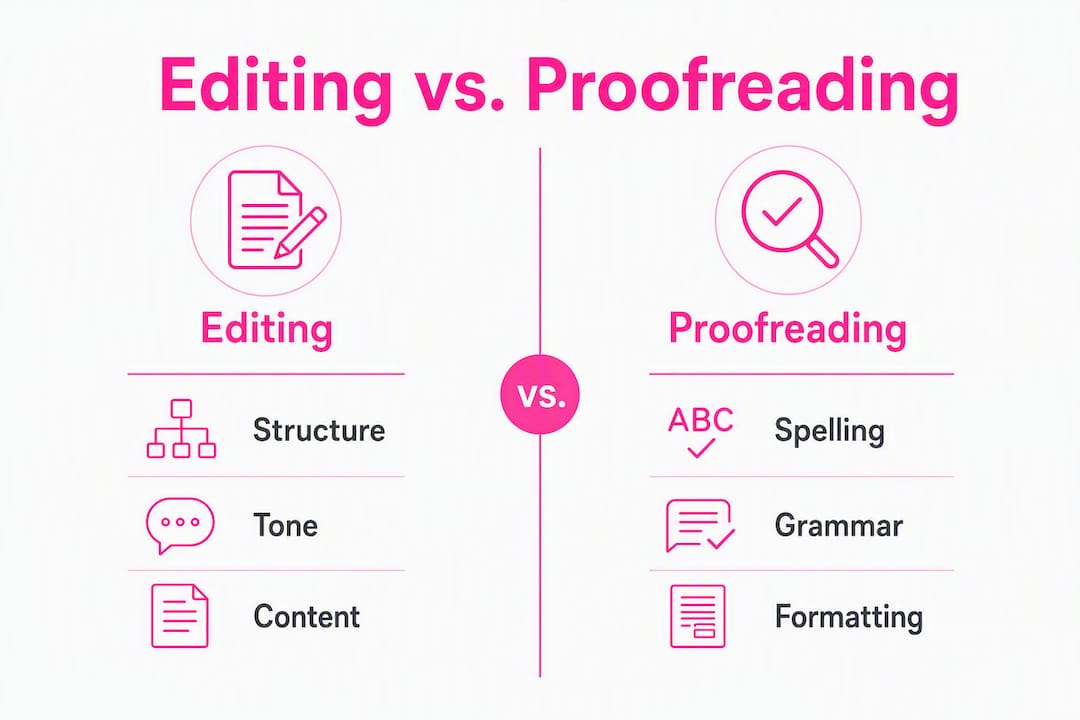
Copyediting sits closest to proofreading in the production chain. Copyediting occurs on the manuscript and covers sentence-level clarity, vocabulary, consistency, and adherence to a style guide such as the Oxford Style Manual, MHRA, or APA. Proofreading, by contrast, happens after typesetting on the page proof.
Typical editing tasks include restructuring paragraphs for logical flow, sharpening an argument, adjusting tone for the intended audience, and checking that citations are consistently formatted. A good editor will also flag where evidence is thin or where a claim needs support.
Pro Tip: When briefing an editor, send the final file format (Word or Google Doc), your chosen style guide, a brief note on your audience, your deadline, and a list of your priorities. Telling an editor “focus on argument and flow, not line-level polish” saves both of you time.
What does proofreading cover?
Proofreading is the final-pass check. It focuses on surface errors — spelling, punctuation, grammar, typography, and layout — after the content has been approved and set into its final form.
A proofreader’s checklist typically covers:
- Spelling: every word, including proper nouns, product names, and technical terms
- Punctuation: commas, apostrophes, quotation marks, and full stops in the right places
- Grammar: subject-verb agreement, tense consistency, pronoun clarity
- Typography: font consistency, bold/italic used correctly, no stray spaces or double spaces
- Layout: correct page numbers, consistent heading styles, no orphaned headings or widowed lines
- Figures and tables: captions match content, numbering is sequential, no misplaced tables
- Hyperlinks: all links resolve correctly and point to the right destination
What proofreaders will not do is equally worth knowing. They will not rewrite paragraphs, restructure arguments, or make substantive changes to content. Fact-checking is outside scope unless explicitly agreed. Production proofreading must also confirm that earlier editorial corrections were applied correctly into the final layout and that typesetting has not introduced new formatting errors.
Proofreading is most effective when carried out on the typeset file — a PDF or final HTML page proof — rather than a working draft. Errors that only appear after layout (broken line breaks, misplaced tables, wrong page numbers) are invisible in an editable document.

When should you edit, and when should you proofread?
The canonical sequence is: draft → editing rounds → typesetting or layout → proofreading → publish. Reversing or skipping stages is a common cause of persistent errors after review, because later edits reintroduce the very mistakes a proofreader already caught.

The table below shows recommended passes by document type.
| Document type | Editing rounds | Proofreading passes | Notes |
|---|---|---|---|
| Blog post | 1 (line/copy) | 1 | Low stakes; self-editing often sufficient |
| Business report | 1–2 (substantive + copy) | 1 | Style guide consistency matters |
| Journal article | 2–3 (developmental + copy) | 1 | Peer review may add extra editing rounds |
| Thesis / dissertation | 2–3 (all levels) | 1–2 | High stakes; separate proofreader recommended |
| Book manuscript | 3+ (developmental, line, copy) | 1–2 | Production schedule usually includes typesetting |
Journal manuscripts often need two to three rounds of editing followed by a single proofread; theses and dissertations may require more rounds and one to two proofreads. Blog posts, by contrast, can often move from a single editing pass straight to publication.
Pro Tip: Leave at least 24 hours between finishing a draft and starting your editing pass. Psychological distance lets you read what you actually wrote, not what you intended to write. The same principle applies between editing and proofreading.
How to self-edit your draft before hiring help
Working through your own draft in a structured order saves money and gets you more from a professional editor when you do hire one. Follow these steps in sequence.
-
Big-picture pass. Read the whole piece without stopping to fix anything. Ask: Does the argument hold together? Is the structure logical? Are there sections that belong elsewhere or could be cut entirely? Make notes in the margin rather than editing as you go.
-
Paragraph-level pass. Work through each paragraph. Every paragraph should open with its main point and develop it in the sentences that follow. Cut any paragraph that repeats a point made elsewhere.
-
Line-level pass. Now look at individual sentences. Replace passive constructions with active ones. Cut filler phrases. Vary sentence length so the rhythm does not become monotonous.
-
Consistency and references pass. Check that terminology is consistent throughout (you have not called the same concept by three different names), that all citations are present and correctly formatted, and that headings follow a single style.
When you are ready to hand the document to a professional, prepare the following:
- The file in the agreed format (Word, Google Doc, or PDF)
- Your chosen style guide (Oxford, MHRA, APA, or house style)
- A brief note on your audience and purpose
- Any terms or names that must be spelled a specific way
- Your deadline and a clear statement of what you want the editor to focus on
Preparing these materials upfront means the editor spends time on your text, not on guessing your intentions. For document editing tools that integrate directly with your workflow, Google Docs add-ons can help you manage versions and comments before you send the file.
Proofreading checklist: your final-pass guide
Use this checklist yourself or hand it to a proofreader. Work through each category in order rather than trying to catch everything in a single read.
| Category | What to check | How to test it |
|---|---|---|
| Spelling | Every word, including names and technical terms | Read backwards, word by word, to isolate each one |
| Punctuation | Commas, apostrophes, quotation marks, full stops | Read aloud; pauses reveal missing or misplaced punctuation |
| Grammar | Subject-verb agreement, tense, pronoun clarity | Isolate each sentence; read it out of context |
| Typography | Consistent fonts, correct use of bold/italic, no double spaces | Print a copy or zoom in on screen |
| Headings | Consistent style, correct hierarchy (H1, H2, H3) | Check against a style sheet |
| Page numbers | Sequential, correct format | Check first and last page, then spot-check middle |
| Figures and tables | Captions match content, numbering is sequential | Cross-reference each figure against its in-text mention |
| Hyperlinks | All links resolve; anchor text is accurate | Click every link in the final file |
| Layout | No orphaned headings, widowed lines, or broken line breaks | View the typeset PDF |
Practical techniques that improve accuracy include reading aloud, focusing on one error type per pass, and printing a physical copy. Each method forces you to slow down and process the text differently.
Pro Tip: Always proofread the typeset file, not the editable draft. Typesetting introduces its own errors — broken line breaks, shifted table positions, wrong page numbers — that are invisible in a Word document. A fresh pair of eyes on the PDF catches what the editor and author have both stopped seeing.
Tools, software, and when to hire a professional
Automated tools and human reviewers serve different purposes. Knowing which to use, and when, saves time and money.
What automated tools do well:
- Catching obvious spelling mistakes and repeated words at scale
- Flagging grammar patterns that commonly signal errors
- Running site-wide checks across hundreds of pages in minutes
- Producing consistent, repeatable reports you can share with a team
Where automation falls short:
- Tone and register: a grammatically correct sentence can still be wrong for the audience
- Argument coherence: no tool can tell you that your third point contradicts your first
- Context-sensitive errors: “their” and “there” are both correctly spelled
- Final layout checks: most grammar tools work on plain text, not typeset proofs
Balancing AI-enabled checks with human oversight is the standard approach for high-stakes documents. Automated tools handle the bulk detection; a human editor or proofreader handles nuance, tone, and final layout.
For website content specifically, automated site scanners provide site-wide, instant reports and are particularly useful as a pre-proofreading pass for multi-page sites. They surface errors across every page simultaneously, something a manual check cannot match at scale.
When to hire a professional proofreader or editor:
- The document is high-stakes (thesis, published book, legal report, press release)
- The argument is complex and you are too close to the text to evaluate it objectively
- Many teams prefer separate people for editing and proofreading to avoid confirmation bias — the same person who edited the text is less likely to catch errors they introduced
- You are working to a publication deadline that requires a guaranteed turnaround
A note on surface polishing: A widespread misconception is that proofreading can salvage a draft with structural weaknesses. It cannot. Surface polishing cannot replace substantive editing. If the argument is unclear, no amount of comma correction will fix it. Get the structure right first, then proofread.
For a broader look at AI proofreading tools and alternatives, including how they compare on accuracy and use case, that resource covers the main options available to writers and teams today.
Key takeaways
Editing and proofreading are sequential, not interchangeable: editing refines structure and clarity first, and proofreading checks surface accuracy last.
| Point | Details |
|---|---|
| Core difference | Editing changes content, structure, and tone; proofreading fixes spelling, punctuation, and layout. |
| Correct order | Always edit before you proofread; reversing the order reintroduces errors the proofreader already caught. |
| When to hire | Use a professional for high-stakes documents; use separate people for editing and proofreading to reduce confirmation bias. |
| DIY first step | Complete a big-picture pass before line-level edits; never proofread a draft that still needs structural changes. |
| Websitespellchecker | Websitespellchecker automates site-wide spelling, grammar, and formatting checks across entire websites, making it a practical pre-proofreading pass for web content. |
The stage most writers skip (and why it costs them)
The most common mistake is not confusing editing with proofreading. It is skipping the gap between them.
Writers finish a draft, run a spell check, and call it done. What they have actually done is proofread a document that still needed editing. The result is a polished surface on a shaky structure, and readers notice the shakiness even when they cannot name it.
The second mistake is treating automated tools as a substitute for human review on high-stakes work. Grammar checkers are genuinely useful for catching patterns at scale. They are not useful for telling you that your argument assumes something your reader does not know, or that your tone shifts from formal to casual halfway through a report. Those are editorial judgements, and they require a person.
There is also a pricing reality worth naming. Professional editing costs more than proofreading, and rightly so. Developmental editing of a full manuscript is a significant investment. But the cost of skipping it and publishing a structurally weak piece is higher: reader trust, professional reputation, and, for academic work, the credibility of the research itself. Proofreading fees are typically lower and turnaround times shorter, often 48–72 hours for a standard document, because the scope is narrower and the decisions are clearer.
For website owners, the calculus is slightly different. A site with fifty pages cannot be manually proofread efficiently. Automated scanning covers the volume; a human reviewer handles the judgement calls. That combination is where most professional teams land.
Catch site-wide errors before your proofreader does
Spelling and grammar errors on a website chip away at visitor trust faster than almost any other content issue. Websitespellchecker gives marketing teams, developers, and agencies a smarter starting point: an AI-powered scanner that checks every page of a site in one pass, flagging spelling mistakes, grammatical errors, awkward phrasing, and formatting inconsistencies across multiple languages simultaneously.

The result is a detailed, downloadable report your team can act on before a human proofreader ever opens the file. That means the proofreader spends time on genuine judgement calls, not hunting for typos across a hundred product pages. Whether you manage a small business site or a large client portfolio, Websitespellchecker for business owners and Websitespellchecker for developers and agencies offer usage-based scanning with no monthly subscription. Run a free scan today and see exactly where your site stands before your next publish.
Useful sources and further reading
The sources below are worth bookmarking depending on your role and document type.
-
The Writing Center, University of North Carolina: Editing and Proofreading — The clearest free explainer available for students and writers. Covers definitions, sequencing, and practical techniques including reading aloud and backwards reading. Start here if you are new to the distinction.
-
CASRAI: Copyediting vs Proofreading — Authoritative production-context explanation of where copyediting ends and proofreading begins. Particularly useful for academic authors and journal editors navigating the manuscript-to-publication pipeline.
-
Websitespellchecker: How to proofread your own writing — Practical self-proofreading guidance for writers and website owners who want to run a thorough check before publishing or sending to a professional.
-
Website staging workflow: a step-by-step guide — Covers the technical workflow for staging and deploying websites, including where to schedule final content checks before going live. Useful for developers and agencies managing pre-launch quality assurance.