Translation quality checks for UK websites: a practical playbook

Translation quality checks, in the website context, are automated site-wide scans of translated pages that catch spelling mistakes, grammar errors, consistency failures, formatting problems, and basic linguistic issues before they reach your visitors. The single most effective approach combines an automated composite quality score (built on a 100-point model) with targeted human review for anything context-sensitive.
Start here:
- Run a site-wide automated scan first to generate a composite score and flag objective errors across every translated page in one pass.
- Automate the repeatable checks: spelling, grammar, placeholder integrity, glossary compliance, and structured data validation.
- Route to a named human reviewer for anything below a score threshold, and for all content involving regulatory language, cultural idiom, or brand tone.
Key takeaways
Automated 100-point quality scoring combined with threshold-based human review is the most practical way to maintain translated website quality at scale.
| Point | Details |
|---|---|
| Automated scoring outperforms manual QA | Platform data shows automated checks reduce sub-standard publication by 96%, versus 67% for manual-only review. |
| Score thresholds route work efficiently | Pages above 85 need a quick check; 70–85 go to standard review; below 70 should be regenerated before any editorial time is spent. |
| Human review covers what automation cannot | Automated tools handle pattern matching; cultural nuance, legal phrasing, and tone require a named human reviewer. |
| Calibration keeps the model accurate | Capture editor overrides monthly and adjust dimension weights to keep automated scores aligned with real editorial judgement. |
| Websitespellchecker supports the full workflow | Site-wide multi-language scans, scan history, en-GB configuration, and downloadable reports fit directly into the scan-to-publish cycle. |
Table of Contents
- Why automated translation quality checks matter for UK websites
- What a 100-point quality score actually measures for translated pages
- How to build the scan-to-publish workflow into your process
- How to read scan results and fix the common flags
- Practical tooling and UK-specific configuration for your web team
- How to monitor score performance and keep your checks calibrated
- Five things you can do this week to improve your translated pages
- Why the score-based approach changes how teams actually work
- Websitespellchecker makes site-wide translation checks practical
- Sources
Why automated translation quality checks matter for UK websites
Automated checks close common quality gaps faster than manual-only workflows, and the difference in detection rates is significant. Platform data from Aether shows automated quality scoring reduces sub-standard content publication by 96%, compared with roughly 67% detection with manual-only QA. That gap represents real risk for UK businesses.
Poor translated pages damage user trust, reduce conversion rates, and can create regulatory exposure. UK consumer-facing websites must meet plain-language expectations under the Consumer Rights Act 2015, and a mistranslated terms-and-conditions page or a garbled returns policy is not just embarrassing — it can be legally problematic.
Three failure modes cause the most harm in practice. Corrupted placeholders (where a variable like {first_name} appears untranslated in a French or German page) make your site look broken. Wrong currency symbols or numeric formats (a comma used as a decimal separator in a locale that expects a full stop) create genuine confusion at checkout. Truncated right-to-left text in Arabic or Hebrew pages can render entire paragraphs unreadable. Automated tools handle these pattern-matching tasks efficiently, but they cannot assess intent or legal interpretation — those judgements still need a human.
What a 100-point quality score actually measures for translated pages
A meaningful automated score is composite, not a single-check pass/fail. The 100-point framework evaluates content across independent dimensions, each weighted to reflect its impact on quality, then combines them into a single routing score.
Sample score breakdown for a product page translated from English to French:
- Spelling / grammar / style: 18/25 (two grammar errors, one style inconsistency)
- Consistency: 8/10 (one glossary term used in its English form)
- Technical compliance: 9/10 (one placeholder left untranslated)
- Structured data: 10/10
- Readability: 8/10
- Factual accuracy: 9/10
- All remaining dimensions: full marks
Total: 79/100 — routes to standard editorial review.
For content that must be citable by AI answer engines, the FocusAI integrity audit framework recommends grounding checks, source provenance, and GEO optimisation signals as part of any quality assessment — worth including in your scoring model if visibility in AI-generated answers matters to your business.
How to build the scan-to-publish workflow into your process
The recommended sequence is: scan → score → route → fix → publish. Every translated page goes through this cycle before it goes live.
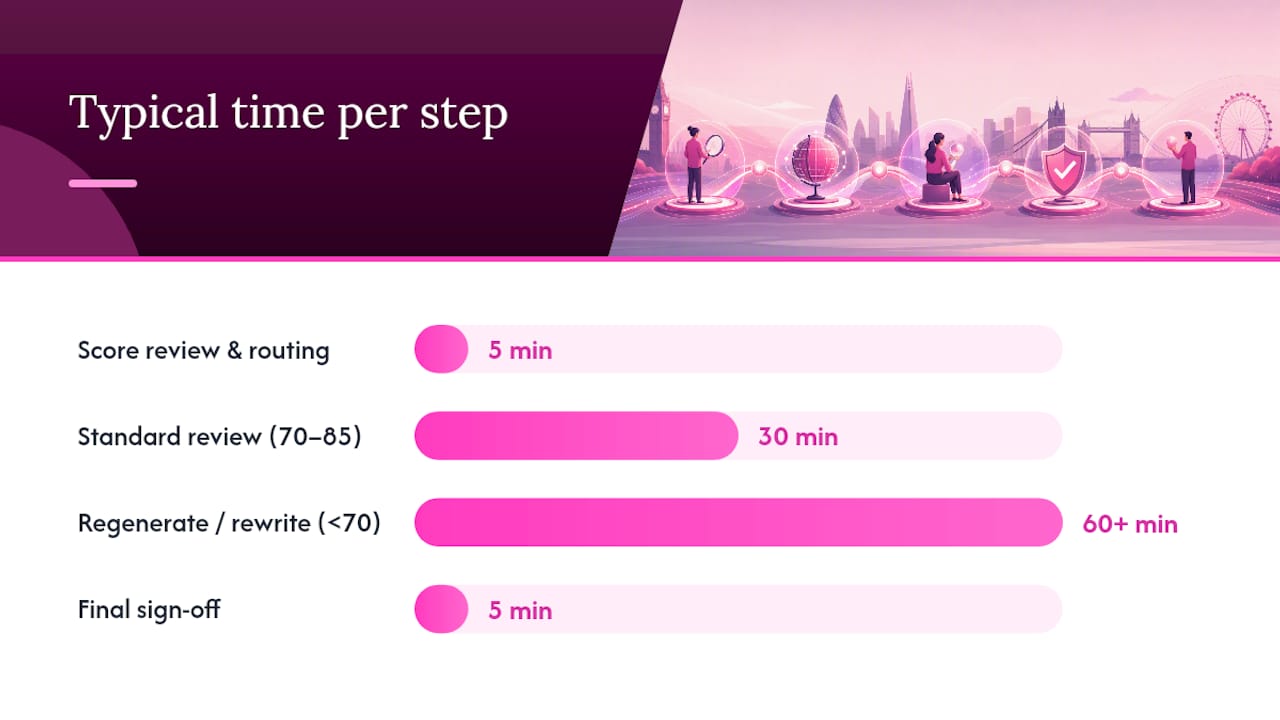
Score-based routing is where the time and cost savings become concrete. Pages scoring above 85 need only a quick human sanity check (typically five minutes). Pages scoring between 70 and 85 go to standard editorial review. Pages below 70 should be regenerated or substantially rewritten before any human review begins — sending a poor draft to an editor wastes their time and yours.
| Step | Typical timing | Owner |
|---|---|---|
| Automated scan | few minutes per page | Developer / content manager |
| Score review and routing | five minutes | Localisation lead |
| Quick check (score >85) | several minutes | Reviewer |
| Standard review (score 70–85) | 30 minutes | Localisation lead + reviewer |
| Regenerate / rewrite (score <70) | 60+ minutes | Content owner + translator |
| Final sign-off | five minutes | Named approver |
Unchecked automated translation creates what practitioners call “translation debt” — a build-up of unresolved quality issues that becomes increasingly costly to fix at scale. Governing your glossaries and scheduling regular scans from the outset prevents that debt from accumulating. For agencies managing multiple client sites, automating client website checks with a consistent scan cadence is the most practical way to keep quality stable across a portfolio.
How to read scan results and fix the common flags
Treat automated flags as diagnostic prompts, not automatic edits. A flag tells you where to look; a human decides what to do.
Common flags and the fix for each:
- Untranslated segments — search for source-language strings in the translated file and send the segment back to the translator with context.
- Placeholder mismatches (
{city},%s,[[name]]appearing in translated text) — restore the correct variable from the source template; never translate the placeholder itself. - Numeric and currency errors — verify locale settings in your CMS and correct the format to match the target market (e.g.
£not€for UK pages, correct decimal separator). - Glossary non-compliance — replace the non-compliant term with the approved glossary entry and update the translation memory.
- Broken RTL rendering — check the
dir="rtl"attribute on the HTML element and test in a right-to-left browser environment. - JSON-LD issues — validate schema markup with Google’s Rich Results Test and correct any missing or malformed fields.
For severity triage, a risk-tiered approach works well: critical errors (safety, legal, broken functionality) fix before publishing; major errors (wrong currency, missing placeholders) fix in the same sprint; minor issues (readability, style) schedule for the next review cycle.
Cultural and contextual checks — tone, idiom, regulatory phrasing — must always go to a human reviewer. Automated tools cannot tell you whether a translated phrase carries an unintended connotation in the target culture, or whether a legal disclaimer meets local requirements.
Practical tooling and UK-specific configuration for your web team
Configure your tools for en-GB and your target language variants before you run a single scan. Getting this right up front prevents a flood of false positives that erode trust in the automated output.
Configuration checklist:
- Set language codes to
en-GB(noten-US) for all English-language pages; set the correct BCP 47 code for each translated locale. - Upload a brand glossary with approved translations for product names, legal terms, and recurring phrases.
- Add domain-specific exceptions (product codes, proper nouns, registered trademarks) to the exclusion list.
- Enable placeholder and tag-handling rules so variables are never flagged as spelling errors.
- Switch on charset and RTL rendering checks for Arabic, Hebrew, or Urdu pages.
- Schedule scans to run automatically after each content deployment.
Websitespellchecker supports multi-language site-wide scans, scan history and change tracking, bespoke scan configuration, and downloadable PDF reports — making it practical to run the full scan-to-publish cycle described above without switching between multiple tools. The technical site audit checklist is a useful companion for teams setting up structured-data and JSON-LD validation alongside linguistic checks.
Pro Tip: Lock glossary terms as “always correct” in your scan configuration before running your first full-site scan. This single step typically eliminates the largest share of false positives and makes the remaining flags genuinely actionable.
How to monitor score performance and keep your checks calibrated
Calibration keeps automated scores aligned with your editorial team’s judgement and improves accuracy over time. Without it, the model drifts away from what your reviewers actually accept.
| KPI | What it tells you | Review cadence |
|---|---|---|
| Pass rate (% pages scoring >85) | Overall translation quality trend | Weekly |
| Override rate | Where automation and humans disagree | Monthly |
| Time saved per review | Efficiency gain from score-based routing | Monthly |
| Critical errors caught pre-publication | Risk reduction | Per sprint |
| Regression count after source updates | Impact of source changes on translations | Per release |
Run a monthly calibration cycle: review all human overrides from the previous month, identify patterns (e.g. reviewers consistently accepting a flag type the tool raises), adjust dimension weights or exception rules accordingly, and document the change. Override data is your most valuable training signal — capturing it systematically is what makes the scoring model smarter over time.
Set up alerts for high-impact regressions: if a source-language page is substantially updated, trigger an automatic rescan of all translated versions. For dynamic content (product descriptions, pricing pages, event listings), schedule daily or weekly scans rather than relying on manual triggers. Grounding AI-assisted content against current sources and maintaining a content ledger are practical governance steps that make your translated content defensible if it is ever questioned.
Five things you can do this week to improve your translated pages
Five actions that materially reduce risk, each completable within a working week:
- Run a site-wide automated scan (owner: developer or content manager; time: 30–60 minutes to set up and run). You will immediately see which pages have the most errors and where to focus first.
- Upload an en-GB glossary (owner: localisation lead or marketing manager; time: 1–2 hours). Approved terms prevent inconsistency across every translated page from day one.
- Fix all placeholder mismatches (owner: developer; time: 1–2 hours depending on volume). Broken variables are the most visible quality failure and the quickest to resolve once identified.
- Validate structured data on your highest-traffic translated pages (owner: developer; time: 2–3 hours). Correct JSON-LD on key pages protects search visibility and AI citation eligibility in multilingual results.
- Assign a named human sign-off for every translated page before it publishes (owner: localisation lead or senior editor; time: ongoing). The four-eyes rule is a low-cost governance step that closes the most significant remaining risk gap.
Why the score-based approach changes how teams actually work
The most common mistake teams make is treating automated quality scoring as a replacement for editorial judgement rather than a filter that makes editorial judgement more efficient. When a reviewer receives a page with a score of 79 and a list of specific flagged dimensions, they spend their time on the things that genuinely need a human — tone, regulatory phrasing, cultural fit. They are not hunting for typos.
Automated scoring can reduce editorial review time substantially, decreasing it to less than half the previous duration per page. by focusing human effort on flagged qualitative dimensions. That is not a marginal gain for a team managing dozens of translated pages a month.
The governance layer matters too. Applying a four-eyes sign-off and maintaining a content ledger that records which pages were AI-assisted, who reviewed them, and when — these steps take minutes to set up and provide a clear audit trail if a translated page is ever challenged. Reserve your domain experts for content above a defined risk threshold (regulatory pages, legal disclaimers, medical information) and let the score do the initial triage for everything else.
Websitespellchecker makes site-wide translation checks practical
Websitespellchecker gives you automated site-wide scanning across multiple languages, with results delivered instantly and a full scan history so you can track quality changes over time. For UK web teams running the scan-to-publish workflow described above, that means fewer errors reaching your visitors and less time spent on manual checking.

Key capabilities that fit directly into the workflow: multi-language scans with en-GB configuration, bespoke scan scope (scan the whole site or target specific page sets), change tracking between scans, and downloadable PDF reports you can share with clients or colleagues. There are no monthly subscriptions — you pay per page scanned, with a free tier to get started.
To begin: sign up and run a free scan on your highest-traffic translated pages, configure your language settings and glossary, then review the report and route fixes using the thresholds in this guide.
Sources
Key sources cited in this guide, recommended for teams implementing translation quality checks:
- Content Quality Scoring: The 100-Point AI Framework
- Compliance in content strategy: a practical UK framework
- The AI content integrity audit: an 11-point regulatory checklist | Focus AI Content Suite
- Translation Errors: Business Risk & Control Guide
- AI generated your content. You’re still liable. | 365i