Web style guide for businesses: audit & enforce

A web style guide is the single source of truth that defines your site’s visual standards, UI component patterns, and editorial rules in one place. Without it, different teams make different decisions, and inconsistency chips away at trust faster than most businesses realise. Here are three things you can do right now:
- Run a quick manual review of your top ten pages, noting spelling, tone, and formatting inconsistencies.
- Run an automated site-wide scan with Websitespellchecker to surface errors your team has missed.
- Assign a named owner to the guide and add references to WCAG 2.1 Level AA and the Associated Press (AP) Stylebook as your editorial foundation.
Table of Contents
- What does a web style guide need to cover?
- How to write editorial rules for a UK site
- What accessibility rules belong in your style guide?
- What should your component library document?
- How do you keep a style guide current?
- How do you enforce the guide across your whole site?
- Why automated spelling and grammar scans matter
- Audit checklist: build or review your style guide today
- How do you get your team to actually follow the guide?
- How do you keep the guide current as language and law evolve?
- Common UK web terms and how to use them
- How to use user feedback to improve your style guide
- Key takeaways
- Why most style guides fail before they’re finished
- Websitespellchecker: instant site-wide editorial enforcement
- Useful sources and references
What does a web style guide need to cover?
A well-structured guide covers three core pillars: visual standards, UI component patterns, and editorial guidelines. Each pillar serves a different audience inside your organisation, but all three must work together.
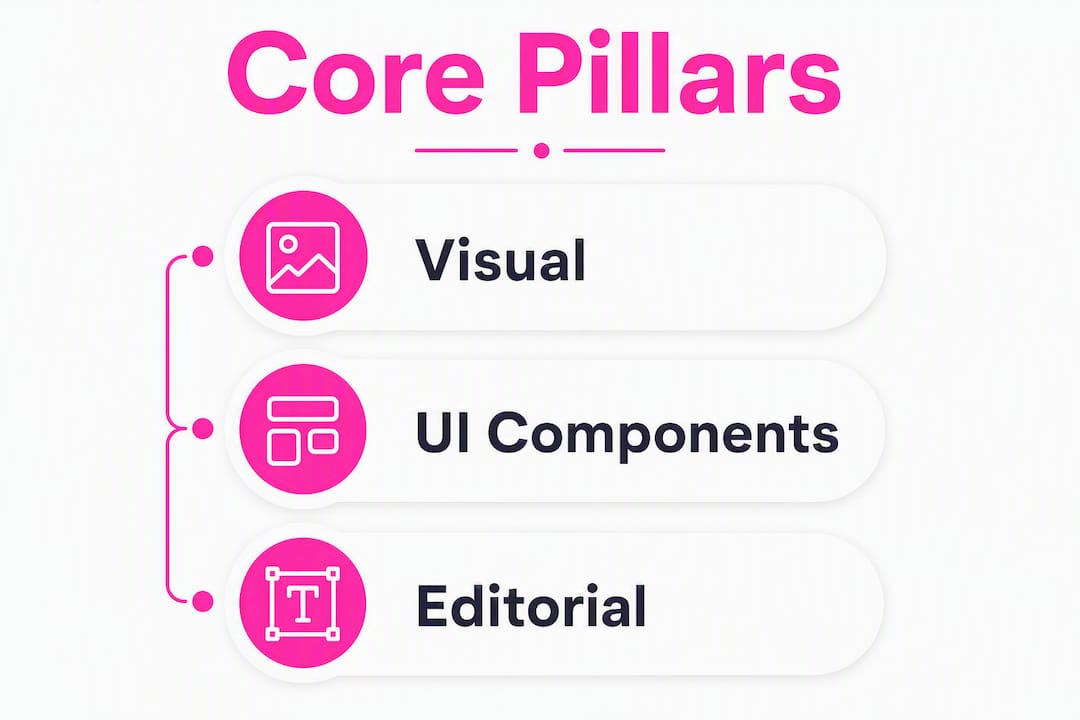
Pillar 1: Visual standards. Document your colour palette with hex codes (e.g. primary brand magenta: #D6006E), your typeface stack (e.g. Inter 16px body, 24px H2), and your grid system (e.g. 12-column, 1,200px max-width). The USDA Web Style Guide is a useful reference for how large organisations document layout and font specifications in reusable templates.
Pillar 2: UI component patterns. For every component, record its name, visual spec, states (default, hover, disabled, error), and the exact copy it carries. A button entry, for instance, should specify label casing (“Add to basket” not “ADD TO BASKET”), maximum character count, and the accessible name for screen readers.
Pillar 3: Editorial guidelines. This is where spelling, grammar, voice, and tone live. A single rule entry might read: Rule: UK spelling. Rationale: our audience is UK-based. Example: “colour” not “color”. Exception: product names retain their own casing. Source: Oxford Style Manual.
How to write editorial rules for a UK site
UK organisations face specific editorial decisions that US-focused guides skip entirely. Getting these right protects both your brand and your legal standing.
Use this rule template as a starting point:
- Rule name: the decision being documented (e.g. date format).
- Rationale: why this rule exists (e.g. UK convention, legal requirement).
- Correct example: the approved form (e.g. 14 March 2026).
- Incorrect example: the form to avoid (e.g. 03/14/2026 or March 14, 2026).
- Exception: any permitted variation (e.g. ISO 8601 in data exports).
- Source reference: the authority behind the rule (e.g. AP Stylebook, Oxford Style Manual).
Common UK-specific decisions to document:
- Spelling: “colour,” “organise,” “centre,” “travelling” throughout; never the American variants.
- Punctuation: single quotation marks for titles, double for direct speech; no Oxford comma unless your house style requires it.
- Numbers: spell out one to nine; use numerals from 10 onwards; percentages as “10%” with no space.
- Dates: day-month-year format (14 March 2026), never month-day-year.
- Currency: £ symbol with no space before the amount (£250).
Many organisations adopt the AP Stylebook as their editorial foundation and layer UK-specific exceptions on top. That approach reduces the volume of rules you need to write from scratch.
What accessibility rules belong in your style guide?
The Public Sector Bodies (Websites and Mobile Applications) (No. 2) Accessibility Regulations 2018 require applicable UK public sector sites to meet WCAG 2.1 Level AA. Private sector organisations are strongly advised to meet the same standard, both for legal risk management and for the significant portion of people in the UK who have a disability.
Editorial teams carry direct responsibility for accessibility, not just developers. Your style guide should include this editorial accessibility checklist:
- Alt text: describe the image’s function, not its appearance. Good: “Bar chart showing Q1 sales by region.” Poor: “Image1.jpg” or “chart.”
- Link text: make every link descriptive in isolation. Good: “Download the accessibility audit template.” Poor: “Click here.”
- Heading order: never skip levels (H1 → H2 → H3). Each page must have exactly one H1.
- Plain language: aim for a lower reading age suitable for general audiences, using short sentences and active verbs; use short sentences and active verbs.
- Colour contrast: body text must meet recommended colour contrast guidelines against its background to ensure readability.
For WordPress sites, a dedicated accessibility checker can flag heading-order and alt-text issues before you publish.
What should your component library document?
Design systems and style guides converge around component-level copy. Documenting microcopy alongside visual specs means writers and developers work from the same source.
Components to document: buttons, CTAs, form fields, error messages, help text, tooltips, empty states, and confirmation messages.
| Element | Recommended length | Example |
|---|---|---|
| Page title (H1) | — | “Your basket (3 items)” |
| Section heading (H2) | 30 characters | “Delivery options” |
| Button label | 2–5 words | “Add to basket” |
| Meta description | — | “Order by 3pm for next-day delivery across the UK.” |
| Error message | 10–20 words | “Enter a valid UK postcode, for example SW1A 1AA.” |
| Help text | 10 words | “We’ll only use your email to send order updates.” |
Error messages deserve particular attention. “Something went wrong” tells the user nothing. “Enter a valid UK postcode, for example SW1A 1AA” tells them exactly what to fix.
How do you keep a style guide current?
A style guide only works if someone owns it. Major institutions treat the guide as a live reference, not a one-off document, and experts recommend publishing it online with embedded code snippets and copy templates rather than issuing a static PDF.
| Role | Responsibility |
|---|---|
| Style guide owner | Final approval on all changes; sets review cadence |
| Editorial lead | Maintains spelling, grammar, and tone rules |
| Design lead | Owns visual standards and component specs |
| Accessibility lead | Reviews all changes against WCAG 2.1 AA |
Review cadence: conduct regular reviews, supplemented by lightweight checks after major product or CMS releases. Log every change in a version history table (version number, date, change summary, approver).
Change requests: anyone on the team should be able to submit a change request via a shared form capturing: the rule affected, the proposed change, the rationale, and a supporting example. The owner reviews and either approves, rejects, or escalates to the relevant lead.
Pro Tip: Link your style guide directly from your CMS dashboard so writers see it before they open a new page template, not after they’ve already published.
How do you enforce the guide across your whole site?
Enforcement works best as a layered workflow rather than a single check. A practical model pairs pre-publish automated linting with scheduled full-site scans and a lightweight triage process.

The workflow runs like this: a writer drafts content in the CMS, a pre-publish hook flags spelling and grammar issues before the page goes live, the developer handoff includes a component-spec check, and a scheduled weekly or monthly scan catches anything that slipped through or changed after publication. Web design best practices for 2026 increasingly treat this kind of automated QA as a standard part of the build pipeline.
Track three KPIs: error rate per 100 pages, number of pages scanned per cycle, and average time-to-fix. These give you a clear picture of whether the guide is actually reducing errors over time.
Why automated spelling and grammar scans matter
Manual proofreading catches perhaps 80% of errors on a good day. On a site with hundreds of pages, that 20% gap represents real damage to your credibility. AI-powered scanning tools identify spelling, grammar, and formatting inconsistencies at scale, covering ground that no human reviewer can match in the same timeframe.
A typical scan report highlights:
- Misspellings and typos across all indexed pages.
- Grammar issues including subject-verb disagreement and missing words.
- Inconsistent usage (e.g. “log in” vs “login” used interchangeably).
- Formatting problems such as inconsistent capitalisation or punctuation.
The run-triage-fix-rescan workflow:
- Run a full site scan and download the report.
- Triage findings by page priority: high-traffic, conversion, and regulatory pages first.
- Fix errors in the CMS and update the style guide if a systemic issue reveals a missing rule.
- Rescan to confirm fixes and track your error rate over time.
Websitespellchecker handles this entire workflow. Its AI scanner covers your whole site in one pass, produces a detailed PDF report you can share with your team, and stores scan history so you can measure progress. For marketing professionals managing large content libraries, that scan history is particularly useful for demonstrating quality improvement to stakeholders.
Audit checklist: build or review your style guide today
Work through this list in priority order. Most teams can complete steps 1–4 within a single working day.
- Run an automated scan of your full site and note the top error categories.
- Manually review your ten highest-traffic pages against your current guide (or against this article’s checklists if you have no guide yet).
- Check that your guide references WCAG 2.1 Level AA and documents alt text, link text, and heading rules.
- Confirm a named owner exists for the guide and that a review date is set.
- Verify that UK spelling, date, number, and currency formats are documented with examples.
- Check that your component library includes microcopy for buttons, errors, and form fields.
- Confirm your CMS has a pre-publish check or hook in place.
- Review your technical site audit checklist to align style guide enforcement with broader QA.
Prioritise pages that are high-traffic, high-conversion, or subject to regulatory requirements (e.g. privacy policy, accessibility statement). Capture your findings in a simple spreadsheet: page URL, issue type, priority, assigned owner, and target fix date.
How do you get your team to actually follow the guide?
A style guide nobody reads is just a document. Adoption depends on making the guide easy to find, easy to use, and part of your existing workflow.
Start with a short onboarding session for new starters that walks through the three pillars and the key rules. Follow up with a one-page quick-reference card covering the most common decisions: spelling standard, date format, heading rules, and link text guidance.
For ongoing adherence, embed the guide into your content brief template. Every brief should include a “style notes” section that links to the relevant guide entries. When a writer finishes a piece, the pre-publish checklist in your CMS should prompt them to confirm they’ve followed the guide before submitting for review.
Resistance usually comes from two places: writers who feel the rules are arbitrary, and developers who see the guide as a content team concern. Address both by explaining the rationale behind each rule (accessibility, legal compliance, brand trust) and by making the guide genuinely useful to developers with CSS snippets and component specs alongside the copy guidance.
How do you keep the guide current as language and law evolve?
Language changes, and so does the law. Your style guide needs a process for both.
For language, assign the editorial lead to monitor the Oxford English Dictionary’s quarterly updates and the AP Stylebook’s annual release. When a new term enters common use (think “generative AI” or “net zero”), add a rule entry within 30 days of it appearing in your content. Flag evolving terms with a “under review” label so writers know the rule may change.
For legal updates, the accessibility lead should monitor GOV.UK’s guidance pages and the Web Accessibility Initiative (WAI) for WCAG updates. WCAG 3.0 is in development; when it reaches recommendation status, your guide will need a structured review against the new criteria. Set a calendar reminder now.
Common UK web terms and how to use them
These are the terms UK web teams get wrong most often. Document each one in your guide with a usage note.
| Term | Correct usage | Common error |
|---|---|---|
| Log in / login | “Log in” (verb), “login” (noun/adjective) | Using “login” as a verb |
| Sign up / sign-up | “Sign up” (verb), “sign-up” (adjective) | Inconsistent hyphenation |
| No hyphen; lowercase unless starting a sentence | “e-mail” or “E-mail” | |
| Website | One word, lowercase | “web site” or “Web Site” |
| Postcode | One word | “post code” |
| Tick box | Two words in UK English | “checkbox” (US English) |
How to use user feedback to improve your style guide
User feedback is one of the most underused inputs for style guide updates. When users contact your support team because they misunderstood a form label or couldn’t find a link, that is a signal that your microcopy or link text needs updating.
Set up a simple feedback loop: review support tickets and live chat logs monthly, tagging any issue that relates to content clarity. If three or more users report the same confusion, treat it as a style guide issue and raise a change request. Similarly, usability testing sessions often surface terminology that users don’t recognise. When a participant says “I didn’t know what ‘proceed to checkout’ meant,” that is a direct brief to simplify the label.
Pair this qualitative feedback with your automated scan data. A page with both a high error rate and a high bounce rate is a priority for both editorial and UX review.
Key takeaways
A web style guide works only when it covers all three pillars, assigns clear ownership, and is enforced through automated scans and pre-publish checks rather than relying on memory alone.
| Point | Details |
|---|---|
| Three pillars are non-negotiable | Every guide must cover visual standards, UI component patterns, and editorial guidelines. |
| UK legal compliance is built in | Reference WCAG 2.1 Level AA and the Public Sector Bodies Accessibility Regulations 2018 in your guide. |
| Governance keeps the guide alive | Assign a named owner, set a six-monthly review, and log every change in a version history. |
| Automation catches what humans miss | Scheduled site-wide scans track error rates and confirm fixes across hundreds of pages. |
| Websitespellchecker enforces at scale | Run a free scan to get an instant PDF report, then use scan history to measure editorial improvement over time. |
Why most style guides fail before they’re finished
The biggest mistake teams make is treating the style guide as a project with an end date. It is not. It is infrastructure. A guide that was accurate in January can be out of date by April if a new product launches, a law changes, or a designer updates the component library without telling the content team.
The second most common failure is building the guide in isolation. When the accessibility lead, the editorial lead, and the design lead each maintain their own documents, you end up with three partial guides that contradict each other. One document, one owner, one review cycle: that is the only model that works at scale.
Automation is not a shortcut; it is a safeguard. Even the most diligent writer misses errors after reading the same page for the fifth time. Scheduled scans remove that dependency on human vigilance and give you a measurable record of quality over time.
Websitespellchecker: instant site-wide editorial enforcement
Spelling and grammar errors across a live website are easy to miss and expensive to ignore. Websitespellchecker gives you a faster route to a clean, consistent site: its AI scanner covers your entire website in a single pass, flags spelling mistakes, grammar issues, inconsistent usage, and formatting problems, and produces a shareable PDF report you can act on immediately.

The workflow is straightforward. Sign up, run your free website spell-check scan, download the report, prioritise fixes by page importance, and rescan to confirm. Scan history means you can show stakeholders a clear before-and-after picture of editorial quality. There are no monthly subscriptions; you pay per page scanned, so it scales with your site rather than your budget.
Start your free scan and see exactly where your site stands today.
Useful sources and references
- Accessibility requirements for public sector websites and apps (GOV.UK): the primary UK legal reference for WCAG 2.1 Level AA compliance and the Public Sector Bodies Accessibility Regulations 2018.
- Web Style Guide (HHS.gov): a detailed editorial guide referencing AP Style; useful for building rule templates and understanding writer responsibilities for accessibility.
- Web Style Guide, 4th Edition (Yale Books): authoritative reference for design system documentation, component libraries, and microcopy conventions.
- Web style guides and accessibility (Yale Usability): explains the three-pillar framework and the role of style guides in accessibility compliance.
- UN Web Style Guide: demonstrates the living-guide model with embedded templates; useful for governance and version-control examples.
- USDA Web Style Guide (PDF): template-driven guidance for layout, typography, and tabular presentation; practical for large multi-site organisations.
- Web Accessibility Initiative (WAI) — WCAG overview: the primary technical reference for WCAG 2.1 criteria and the forthcoming WCAG 3.0 development.