Website handoff checklist: your 8-point pre-launch review

Before any page goes live, run these eight checks: content accuracy, spelling and grammar, links and forms, metadata and headings, images and accessibility, formatting and visual consistency, staging and technical quick tests, and rollback and sign-off.
Skipping any one of these matters more than most teams realise. Two typographic errors on a page reduce perceived trustworthiness by an average of 5.91 points on a 0 to 100 scale, and five errors drop it by 13.55 points — a near-linear penalty that stacks with every mistake left on the page. Google’s John Mueller has also said spelling and grammar aren’t direct ranking factors, but they shape how much readers trust and engage with your site, which feeds back into performance anyway.
- Content accuracy (prices, dates, phone numbers, headlines)
- Spelling and grammar, site-wide
- Links, forms and CTAs
- Metadata and headings (titles, meta descriptions, H1/H2)
- Images and accessibility (alt text, file names)
- Formatting and visual consistency
- Staging and technical quick checks
- Rollback plan and sign-off
Pro Tip: Run an automated scan of the whole site, fix what it flags, then do one human read-aloud pass before anyone signs off. Each catches errors the other misses.
Key Takeaways
A website handoff checklist that pairs an automated site-wide scan with a human read-aloud pass catches both visible errors and the contextual mistakes spellcheckers miss.
| Point | Details |
|---|---|
| Errors cost trust fast | Just two typographic errors cut perceived trustworthiness by nearly 6 points on a 0 to 100 scale. |
| Automation has limits | Scans catch misspellings and broken links but miss wrong prices, outdated names, and tone problems. |
| Assign named roles | Give one person ownership of content approval, proofing, QA testing, and deployment each. |
| Sign-off needs artefacts | A scan report, issue list, and signed checklist should exist before any page goes live. |
| Websitespellchecker supports the scan step | It provides site-wide scanning, change tracking, and downloadable reports for handoff sign-off. |
Table of Contents
- Website handoff checklist: page-level and site-level detail
- What automated site scans catch, and what they still miss
- Manual proofing techniques that catch what tools don’t
- Handoff workflow: roles and sign-off before launch
- Technical and SEO checks for the content handoff
- Staging checks across browsers and devices
- A printable website handoff checklist you can use today
- Who actually owns the final website content?
- Why I run both an automated scan and a read-aloud pass
- How Websitespellchecker fits into your handoff
- Frequently asked questions
- Sources
Website handoff checklist: page-level and site-level detail
A handoff checklist only works if every item has a clear owner, a method, and a pass or fail line. Split your review into two layers: what lives on individual pages, and what governs the whole site.
Page-level checks cover headlines, H1 and H2 tags, body copy, calls to action, forms, images, alt text, and meta titles and descriptions. Site-level checks cover site search, navigation, canonical tags, stray noindex tags, leftover staging URLs, and the copyright year in the footer, which is the single most common thing teams forget to update.
For each item, decide what “pass” actually looks like before you start reviewing, not while you’re halfway through the homepage.
| Check | Method | Pass criteria | Common failure |
|---|---|---|---|
| Headlines and H1/H2 | Manual read + view source | One H1 per page, headings in logical order | Two H1 tags on one page from a template error |
| Body copy accuracy | Compare against approved brief | Matches signed-off copy document | Old pricing tier left in a paragraph after a rebrand |
| Forms and CTAs | Submit a live test entry | Correct recipient, confirmation message shows | Contact form still emailing the old account manager |
| Meta title/description | Crawl or manual page-by-page check | Unique per page, under length limits | Duplicate meta titles across service pages |
| Alt text and file names | Inspect image tags | Descriptive, no “image1.jpg” | Alt text left blank on product photos |
| Copyright year and legal text | Manual footer check | Current year, correct entity name | Footer still reads a previous year at launch |
Contextual errors are the ones that slip through spellcheck entirely, because the words are spelled correctly. Purdue’s Online Writing Lab recommends verifying names, dates, and phone numbers by actually using them, not just reading past them. That means dialling the number on the contact page, checking the plan names in your pricing table against what sales is actually selling this quarter, and confirming the legal text on your terms page matches what compliance signed off.
A few habits make this repeatable rather than heroic:
- Keep a single change log or issue tracker entry for every content fix, so nobody re-reports the same typo twice.
- Assign one name per section of the site, not a vague “team review”.
- Timestamp every pass, so you know whether a fix was made before or after the last scan.
Treat this table as your working document, not a one-off. Print it, attach it to the deployment ticket, and update it every time you re-run a check.
What automated site scans catch, and what they still miss
Automated scanning tools are efficient at what they’re built for: misspellings, repeated words, broken links, missing alt attributes, duplicate page titles, basic grammar flags, and staging URLs that were never swapped out for live ones. A tool that can scan large websites in one pass will find these far faster than a human clicking through every page.
What they won’t catch: a phone number that’s spelled correctly but connects to the wrong department, a price that’s grammatically fine but out of date, or a tone that doesn’t sound like your brand. Deliberate stylistic spellings and nuanced grammar choices also confuse most scanners. Given the near-linear trust penalty per visible error, automation earns its place by clearing the volume of obvious mistakes so your human reviewers can focus on context.
A decent audit report should show:
- Error location by page and line
- Severity or category of each flag
- A change history so you can prove fixes were made
Pro Tip: Run your first scan early in the build, then run a second one immediately after content fixes go in. Keep both reports. That pairing becomes your sign-off evidence.
Manual proofing techniques that catch what tools don’t
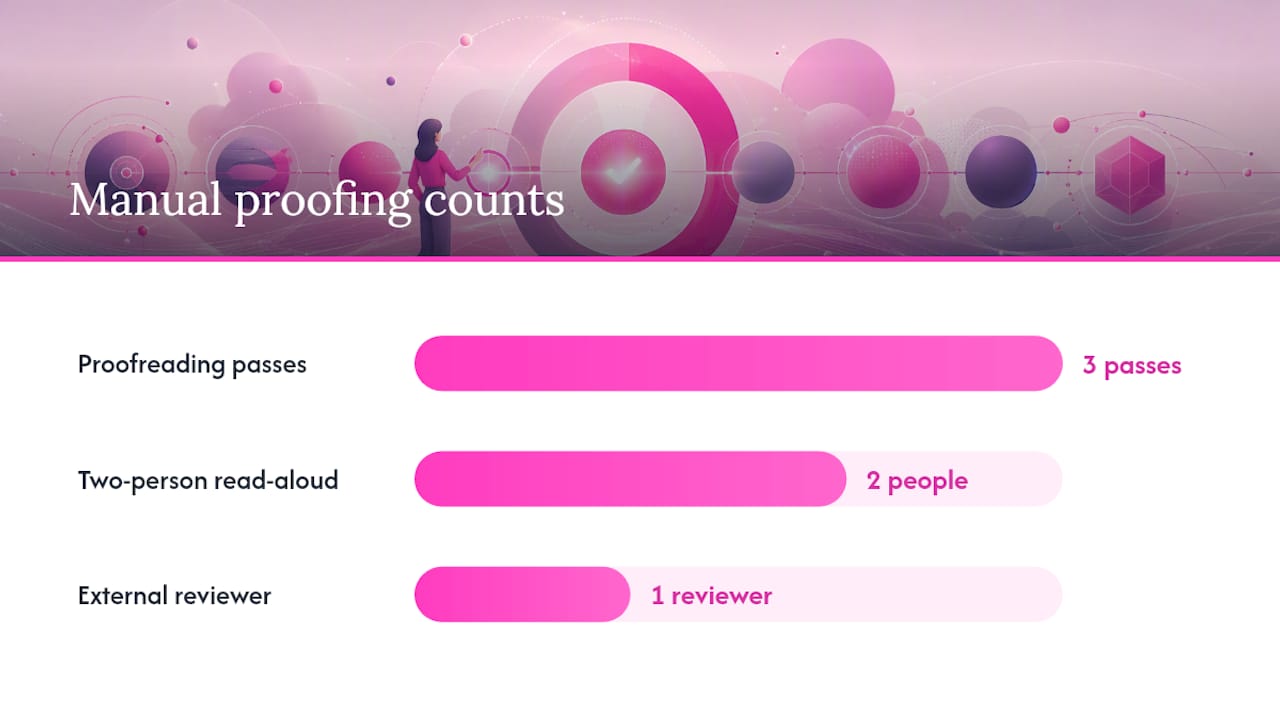
Multi-pass proofreading works better than trying to catch everything in one read. Do a focus pass for typos and formatting, a facts pass for names, numbers and dates, and a flow pass for tone and readability. Each pass has a different job, so combining them into one skim-read is how errors survive.
A simple two-person read-aloud review:
- One person reads the page aloud, word for word, while the other follows the live screen.
- Stop at every number, name, or date and confirm it against the source document.
- Click every link and submit every form on the page, using a real test email and test phone number.
- Note anything that sounds off out loud, even if it’s spelled correctly.
- Log every fix before moving to the next page.
Context errors are the trap here: a plan name that changed last quarter, last year’s pricing left in a case study, or an executive bio for someone who’s since left the company. None of these trip a spellchecker. Proofreading guidance from Purdue OWL specifically recommends reading text aloud and taking a break before a final pass, because fresh eyes catch what tired ones skip.
Pro Tip: Bring in one reviewer who’s never seen the project. Insiders read what they expect to see; outsiders read what’s actually there.
Handoff workflow: roles and sign-off before launch
A clean web project handoff needs named roles, not shared responsibility. Define a content owner (approves the words), a copyeditor or proofreader (catches errors), a QA tester (checks functionality), a product owner or client approver (final business sign-off), and a deployment engineer (pushes it live).
Sign-off should produce a paper trail, not just a verbal “looks good”:
- Automated scan report attached to the ticket
- List of issues found and confirmation each was resolved
- Completed manual proof checklist, signed by the reviewer
- Stakeholder sign-off, dated
No page goes live until all four exist. Version control matters here too: nothing publishes from staging until the rollback plan is documented and everyone knows which build is live. Agencies managing this for clients often lean on structured website services support to keep versioning and approvals consistent across projects.
Technical and SEO checks for the content handoff
Non-developers can still verify these before launch. Check that robots.txt and any noindex tags used on staging have been removed, canonical URLs point to the live domain, meta titles and descriptions are unique per page, every page has exactly one H1, structured data hasn’t broken, and the sitemap includes every live URL. Spot-check for 404s and confirm redirects from any changed URLs actually work.
For performance and UX: run a quick page speed check, confirm images are compressed rather than uploaded at full camera resolution, and click every CTA to confirm it lands on the correct page, not a placeholder.
- Robots.txt and noindex tags removed from live pages
- Canonical URLs correct
- Unique meta titles and descriptions
- One H1 per page, structured data intact
- Sitemap current, redirects tested
- Alt text meaningful, keyboard navigation works, contrast readable
A technical site audit checklist is worth keeping alongside your content checklist, since the two failure types often surface together.
Staging checks across browsers and devices
Run your final review across a short test matrix rather than every possible combination: desktop Chrome, desktop Firefox, Safari, the latest iOS Safari on an iPhone, and Android Chrome. On each, check that layout holds, images load, and text doesn’t overflow its container.
| Environment | What to check |
|---|---|
| Desktop Chrome | Layout, forms, CTA placement |
| Desktop Firefox | Font rendering, spacing |
| Safari (macOS) | Layout consistency, video embeds |
| iOS Safari (iPhone) | Touch targets, mobile navigation |
| Android Chrome | Form fields, image scaling |
Staging environments often carry stale CSS, missing content fragments, or translation fallbacks showing the wrong language. Mixed-content warnings, where a secure page loads an insecure resource, are another common miss. A website usability review can help structure this pass if you’re covering a large site.
Pro Tip: Check your homepage, pricing page, contact page, and top product or service page first. They carry most of your traffic, and most of your risk.
A printable website handoff checklist you can use today
Copy this into your deployment ticket or print it for a final sign-off meeting:
- Site: _______ Page(s) reviewed: _______
- Reviewer: _______ Date: _______
- ☐ Content accuracy (prices, dates, contact details)
- ☐ Spelling and grammar, site-wide scan complete
- ☐ Links, forms and CTAs tested live
- ☐ Metadata and headings verified per page
- ☐ Images and alt text checked
- ☐ Formatting and visual consistency confirmed
- ☐ Staging and technical checks passed
- ☐ Rollback plan documented; Sign-off: _______
Who actually owns the final website content?
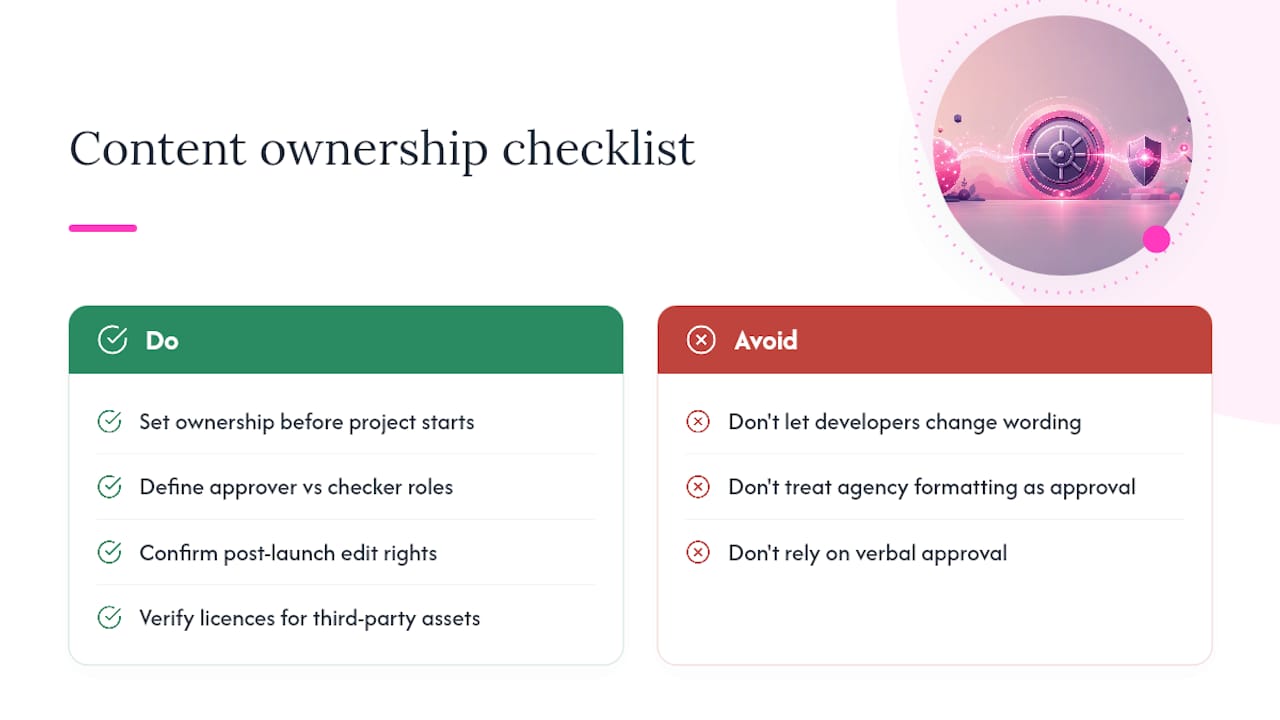
Before anyone hits publish, someone needs to be able to say, unambiguously, “this content is approved and I’m responsible for it.” That sounds obvious. In practice, ownership gets fuzzy fast, especially on agency projects where copy passes through a writer, a client stakeholder, a designer who tweaks wording to fit a template, and a developer who pastes in a “final” version that isn’t quite final.
Set ownership before the project starts, not during the handoff. The content owner — usually the marketing manager or client contact — holds final approval rights over wording, pricing, and claims. The agency or content team holds responsibility for accuracy checks and formatting, but not final sign-off authority. That distinction avoids the common dispute where a developer changes a headline for layout reasons and nobody notices it shifted the meaning.
Permissions matter just as much as approval. Confirm who has edit access to the CMS after launch, who’s authorised to make post-launch copy changes without a fresh sign-off, and whether stock images, testimonials, or third-party logos used on the site actually have licence to be there. A complete website audit guide is a useful reference point for building this into a standard operating procedure, so ownership doesn’t get reinvented on every project.
Write the ownership structure down. A verbal agreement about who approves what doesn’t hold up when a launch goes wrong at 6pm on a Friday.
Why I run both an automated scan and a read-aloud pass
An automated scan is fast at scale. It’ll flag fifty misspellings across two hundred pages before you’ve finished your coffee. What it won’t tell you is that the homepage headline still promises “2025 pricing” or that the phone number in the footer connects to a fax line nobody’s used in years.
I’ve seen a scan come back completely clean while a read-aloud pass, minutes later, caught a wrong price sitting in plain sight. That’s the trust penalty in action before a single visitor even complains. Running both isn’t belt and braces for its own sake. It’s the difference between finding the mistake before launch and finding it in a customer email after.
How Websitespellchecker fits into your handoff
You’ve now got the manual side covered: read-aloud passes, fact checks, sign-off roles. The piece most teams underbuild is the scan itself, especially on larger sites where clicking through every page just isn’t realistic.

Websitespellchecker runs a site-wide automated scan that flags misspellings, repeated words, and inconsistent phrasing across every page in one pass, then tracks what’s changed between scans so you have a clear before-and-after for your sign-off file. Reports export as a shareable PDF, which slots straight into the artefact trail your product owner or client approver will want to see before launch. For agency teams juggling multiple client sites, that saves the repetitive manual re-checking that eats into billable hours. There’s no subscription lock-in either: you pay per scan, with a free tier to start. If you’re building a handing off website process for your marketing team, run a free scan on your current site today and see what it flags before your next launch.
Frequently asked questions
What should be on a website handoff checklist before launch? A solid checklist covers content accuracy, spelling and grammar, links and forms, metadata and headings, images and accessibility, formatting consistency, staging and technical checks, and a documented rollback plan.
Who should sign off on a website before it goes live? The product owner or client approver gives final sign-off, based on a completed scan report, resolved issues list, and a signed manual proof checklist from the copyeditor or QA tester.
Can automated tools replace manual proofreading entirely? No. Automated scans catch spelling, broken links, and duplicate metadata efficiently, but they miss contextual errors like outdated prices or wrong phone numbers that need a human read-aloud pass to catch.
How long before launch should a final website review happen? Run the first full scan and manual review at least a few days before launch, then a second scan immediately after final fixes, so there’s time to resolve anything found without rushing sign-off.