Website quality assurance tools for spelling and grammar

Spelling and grammar errors on your website chip away at customer trust faster than almost any other content problem. Website quality assurance tools, specifically those built for text quality, are automated platforms that scan every page of your site, flag linguistic mistakes, and give you the evidence to fix them quickly. The best ones use AI to catch not just typos but awkward phrasing, missing words, and inconsistent usage across hundreds of pages at once. Proactive QA is the strongest defence against errors reaching your visitors before you do.
Key capabilities to expect from a quality text QA platform:
- Full-site automated scanning, not just single-page checks
- AI-powered detection of spelling, grammar, phrasing, and formatting issues
- Detailed reports with error logs and screenshots for fast resolution
- Scan history tracking so you can monitor changes over time
- Support for UK English alongside other language variants
- Websitespellchecker delivers all of the above with instant results and downloadable PDF reports
Table of Contents
- What features matter most in website quality assurance tools?
- Why automated QA pays for itself quickly
- How to choose the right QA tool for your business
- Leading website QA tools for spelling and grammar in the UK
- How QA tools connect with your CMS and workflow
- What does website QA actually cost?
- Why UK English accuracy matters more than you think
- Can non-technical users actually run these tools?
- How UK businesses are using automated text QA in practice
- Websitespellchecker: text QA built for businesses that care about quality
- Key takeaways
What features matter most in website quality assurance tools?
The difference between a useful QA tool and a frustrating one usually comes down to how much context it gives you. Evidence-backed error reports with screenshots and HTTP logs let your team diagnose and fix issues in minutes rather than hours. Without that detail, you are left guessing.
- Full-site scanning: the tool must crawl your entire domain, not just a sample
- AI error detection: covers spelling, grammar, awkward phrasing, missing words, and formatting inconsistencies
- UK English support: dedicated language models that distinguish British from American spelling conventions
- CMS integration: compatible with WordPress, Drupal, Joomla, and similar platforms
- Non-technical UI: clean dashboards that content teams can use without developer support
- Change tracking: monitors your site over time so new errors surface immediately
Pro Tip: Set scan frequency based on how often pages are updated. High-traffic landing pages warrant weekly scans; static policy pages can be checked monthly. This approach avoids alert fatigue and keeps your team focused on what matters.
Why automated QA pays for itself quickly
Manual proofreading across a large website is slow, inconsistent, and expensive. Automated tools shift you from reactive to proactive quality assurance, catching errors before visitors see them rather than after a complaint lands in your inbox. AI-powered autonomous tools now simulate real user behaviour, covering ground that manual reviewers routinely miss.
- Time savings: scanning hundreds of pages takes minutes, not days
- Consistency: AI applies the same rules to every page, every time
- Brand credibility: error-free copy signals professionalism and builds trust
- SEO benefit: search algorithms factor in content quality, and linguistic errors can suppress rankings
- Faster fixes: AI remediation generates specific, actionable repair instructions rather than vague flags
How to choose the right QA tool for your business
Picking the wrong tool wastes budget and creates more work. Work through these criteria before committing:
- Accuracy for UK English: confirm the tool has a dedicated British English model, not just a generic spell-checker defaulting to US conventions
- Detection breadth: look beyond spelling to grammar, phrasing, missing words, and formatting
- Evidence quality: reports should include screenshots and error logs, not just line numbers
- CMS compatibility: check whether it integrates directly with your platform via a plugin or API
- Ease of use: your content team should be able to run scans and read reports without IT involvement
- Pricing model: usage-based pay-per-page billing suits businesses with variable scan volumes better than fixed monthly subscriptions
- Scalability: the tool should handle your site as it grows without requiring a platform change
Leading website QA tools for spelling and grammar in the UK
AI has transformed what text QA tools can do. The best platforms now go well beyond basic spell-checking, offering full-site content audits that cover readability, brand consistency, and tone alongside spelling and grammar.
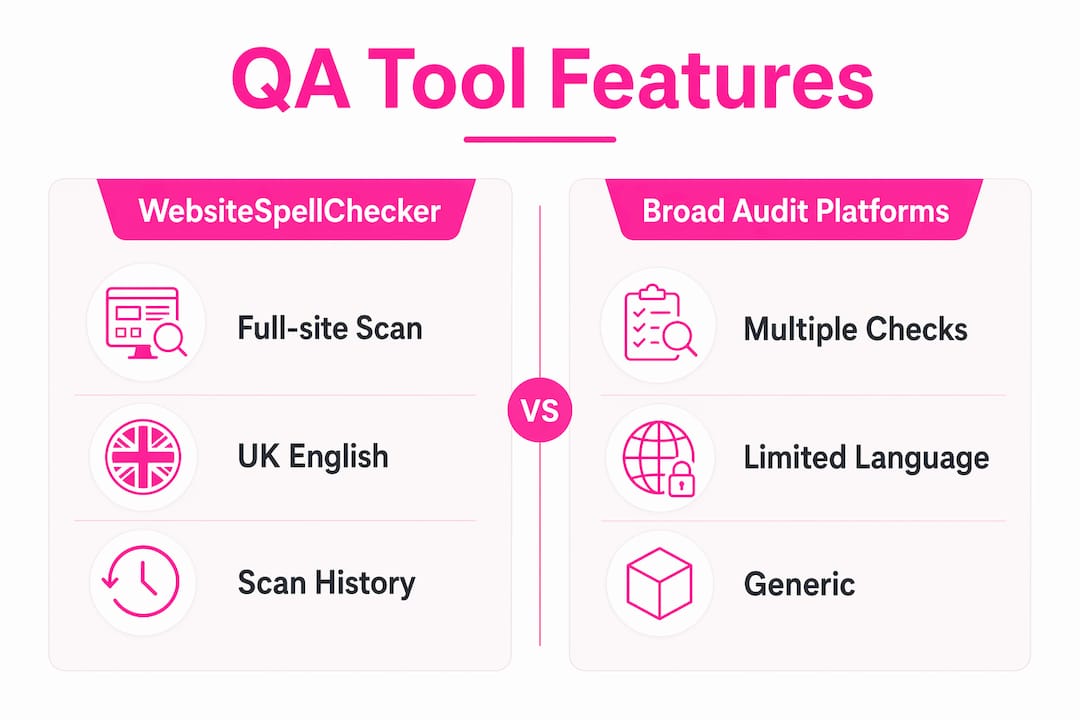
- Websitespellchecker: AI-powered scanning across entire websites with multi-language support, instant results, scan history tracking, bespoke configuration, and downloadable PDF reports. Designed specifically for spelling and grammar QA, making it the most focused option for UK businesses and content teams. Offers a free tier with no monthly subscription required.
- Broad-scope audit platforms: tools that bundle spelling and grammar checks alongside SEO, accessibility, and performance audits. Useful if you need consolidated reporting, though text quality is rarely their primary focus.
- CMS-native plugins: lightweight options that check content within WordPress or similar platforms at the point of publishing. Practical for small sites but limited in scan depth and reporting detail.
| Feature | Websitespellchecker | Broad-scope audit platforms | CMS-native plugins |
|---|---|---|---|
| Full-site spelling and grammar scan | Yes | Partial | Limited |
| UK English support | Yes | Varies | Varies |
| Scan history tracking | Yes | Some | Rarely |
| Downloadable PDF reports | Yes | Some | No |
| Free tier | Yes | Some | Often |
| Pay-per-page billing | Yes | Rarely | No |
How QA tools connect with your CMS and workflow
Integration is what turns a one-off audit into continuous quality monitoring. Most UK businesses run their websites on WordPress, Drupal, Joomla, or Wix, and the best QA tools connect with these platforms without requiring custom development.
- Plugins and extensions: install directly into your CMS for scheduled or on-demand scans
- API access: allows developers to trigger scans programmatically and pull results into existing dashboards
- CI/CD pipeline integration: frameworks like Playwright and Cypress support automated checks before deployment, catching errors before they reach production
- Scheduled scans: set recurring checks during off-peak hours so reports are ready when your team starts the day
- Direct fix workflows: some platforms generate repair instructions that slot straight into your editing environment
For marketing teams, the practical benefit is that errors get caught before a campaign goes live, not after. For developers, API access means QA becomes part of the deployment process rather than an afterthought. A good website audit checklist can help you map which integration points matter most for your setup.
What does website QA actually cost?
Pricing models vary considerably, and the right structure depends on how your site grows and how often you scan.
- Pay-per-page: you pay only for pages scanned, making it cost-effective for sites with variable content volumes. Websitespellchecker uses this model.
- Subscription tiers: fixed monthly fees with page or scan limits. Predictable budgeting but can mean paying for capacity you do not use.
- Free tiers: most platforms offer limited free scanning. Websitespellchecker’s free tier covers up to 50 pages per scan with no subscription required.
- Enterprise pricing: custom contracts for large organisations with high page volumes and compliance requirements.
| Pricing model | Best suited to | Cost predictability |
|---|---|---|
| Pay-per-page | Variable-volume sites | High |
| Monthly subscription | Consistent scan schedules | Medium |
| Free tier | Small sites or evaluation | N/A |
| Enterprise custom | Large organisations | Negotiated |
The real cost comparison is against manual QA. A content team spending hours each week on manual proofreading across a growing site will almost always find automated scanning cheaper once you account for staff time.

Why UK English accuracy matters more than you think
A tool that defaults to US English will flag “colour,” “organise,” and “licence” as errors on a British website. That is not a minor inconvenience; it undermines trust in the tool’s output and wastes your team’s time dismissing false positives. Dedicated UK English language models are the baseline requirement for any business serving a British audience.
- US versus UK spelling differences run to thousands of words, covering -ise/-ize, -our/-or, -re/-er, and many irregular forms
- Grammar rules also differ in subtle ways, including collective noun agreement and punctuation conventions
- AI advancements now allow tools to distinguish regional language variants with far greater accuracy than rule-based checkers
- Always test a tool against a sample of your own content before committing, specifically checking whether it handles British spellings correctly
- Businesses targeting UK audiences should treat dedicated British English support as a non-negotiable requirement, not a nice-to-have
Can non-technical users actually run these tools?
The short answer is yes, provided you choose a tool designed with content teams in mind. The best platforms present errors in plain language, grouped by severity, so a copywriter can act on findings without needing a developer to interpret the report.
- Clear dashboards: errors categorised by type and severity, not buried in raw data
- Downloadable reports: PDF exports that can be shared with editors, managers, or clients without logging into the platform
- One-click or guided fixes: AI-generated repair instructions written in plain English
- Minimal setup: tools like Websitespellchecker require only a URL to start scanning, with no configuration files or technical knowledge needed
- Support documentation: written for content professionals, not engineers
The goal is that your marketing manager can run a full-site scan on a Monday morning, share the PDF with the content team by lunchtime, and have corrections published before the end of the day. That kind of workflow is realistic with the right tool.
How UK businesses are using automated text QA in practice
Across e-commerce, professional services, and publishing, UK businesses are finding that automated spelling and grammar QA delivers measurable improvements to content quality and team efficiency.
A digital marketing agency managing websites for multiple clients used scheduled automated scanning to catch errors introduced during content updates. Before automation, errors were typically discovered by clients or visitors. After implementing a QA tool with scan history tracking, the team identified and resolved issues within hours of each content update, before any client noticed.
Content teams at media organisations have used automated QA to maintain consistency across large article archives, where manual checking at scale was simply not feasible. The ability to automate client website checks across dozens of domains from a single dashboard changed what was possible for small teams.
For e-commerce businesses, the stakes are particularly high. A misspelled product name or a grammatical error on a checkout page can erode the confidence a customer needs to complete a purchase. Automated QA running on a regular schedule means those errors surface internally, not in a customer review.
Websitespellchecker: text QA built for businesses that care about quality
Most broad-scope audit tools treat spelling and grammar as one checkbox among dozens. Websitespellchecker is built specifically for text quality, which means every feature, from its AI scanning engine to its PDF reports, is designed around the job of keeping your website copy accurate and professional.

You get full-site scanning across every page, multi-language support with dedicated UK English accuracy, scan history so you can track improvements over time, and detailed reports you can share with your team or clients immediately. There is no monthly subscription. You pay only for the pages you scan, and you can scan up to 50 pages free with no credit card required. For businesses that need a dedicated solution rather than a generic audit tool, Websitespellchecker is the practical choice. Run your first scan today and see exactly what your website looks like to a reader who notices every error.
Key takeaways
Automated AI-powered spelling and grammar QA tools are the most practical way for UK businesses to maintain professional, error-free website content at scale.
| Point | Details |
|---|---|
| Proactive QA prevents errors | Automated scanning catches mistakes before visitors see them, protecting brand credibility. |
| UK English support is essential | Tools must have dedicated British English models to avoid false positives on standard UK spellings. |
| Evidence-backed reports save time | Reports with screenshots and logs let teams fix issues in minutes rather than hours. |
| Pay-per-page suits variable sites | Usage-based billing avoids paying for capacity you do not use, keeping costs proportional. |
| Websitespellchecker is purpose-built | It focuses entirely on spelling and grammar QA, with a free tier covering up to 50 pages per scan. |