Scale Proofreading for Large Sites: 4 Stage Approach for Content Ops

For large sites, the reliable approach is automated site-wide scanning paired with a short human triage cycle. This gives you full coverage across every page without slowing down releases, catches issues before customers do, and creates a record you can track over time. Manual review alone simply cannot keep pace once a site passes a few hundred pages.
TL;DR:
- Automated site-wide scanning paired with regular human triage is essential for maintaining full coverage and tracking improvements across large websites.
- Deep crawling must cover behind paginations, JavaScript content, and recognize templates to avoid false positives and ensure comprehensive detection.
- Incorporating scans into pre-publish checks and CI pipelines prevents errors from reaching live sites, reducing post-deployment fixes.
- Managing multilingual content requires separate glossaries and locale-specific formatting checks to prevent translation errors and regional inconsistencies.
- Ongoing, clear ownership and structured triage processes are vital for scalable proofreading and effective resolution tracking on enterprise websites.
Table of Contents
- How do you run a proofreading workflow for large websites?
- What should an automated site-wide scanner actually do?
- Building proofreading into your CMS and publishing pipeline
- Proofreading multilingual and localised website content
- How do you turn scan findings into tracked fixes?
- What does proofreading cost at scale, and how do you budget for it?
- Catching contextual and semantic errors beyond spelling
- Proofreading dynamic pages, templates, and user-generated content
- Publisher perspective: what actually scales in enterprise proofreading
- How Websitespellchecker fits this workflow
- Sources
How do you run a proofreading workflow for large websites?
Proofreading large websites breaks down cleanly into four stages, and skipping any one of them is usually where teams get caught out. You discover what actually exists on the site, detect issues automatically, triage by real business impact, then fix and verify. Treat it as a cycle, not a one-off project.
- Discover. Crawl the full site to build an accurate inventory, including orphaned pages, staging content, and anything CMS templates generate dynamically. You cannot proofread what you have not found.
- Detect. Run an automated scan across every discovered page. This is where speed matters most, since checking thousands of pages by eye simply is not viable within a normal release cycle.
- Triage. Rank findings by where they sit and what they touch, not by how many errors a page has.
- Fix and verify. Assign fixes, deploy them, then re-scan the same pages to confirm they are actually resolved.
Ownership matters here. The content owner should sign off on tone and factual accuracy, a developer handles anything tied to templates or dynamic fields, and QA confirms the fix landed in production rather than just in a draft. Report progress weekly on a large site, monthly once things stabilise. For a smaller site, expect a full cycle in a few days. For very large sites, budget several days to a couple of weeks for the first pass, with recurring scans running far faster once glossaries and templates are configured.
Pro Tip: Run your first full scan before you touch anything else. It gives you a baseline error count, and every improvement afterwards has something concrete to measure against.
What should an automated site-wide scanner actually do?
Not every tool that claims to “scan websites” is built for scale, and the gap shows up fast once you point one at a real enterprise site. Before relying on any automated checker, confirm it handles the mechanics that matter on large properties.
- Deep crawling that reaches pages behind pagination, filters, and JavaScript-rendered content, not just the pages linked from the homepage.
- Template awareness, so the tool recognises repeated structural elements and does not flag the same boilerplate error a thousand times.
- Language profiles and glossaries, letting you register brand names, product terms, and technical vocabulary so they are not misread as spelling mistakes.
- Batch exports and scheduling, so results land in a usable file on a recurring basis rather than requiring a manual trigger each time.
- API or CI hooks, allowing checks to run automatically as part of your existing build or publishing pipeline.
- Consistent performance across thousands of pages, without timing out or silently dropping sections of the crawl.
Read results with a critical eye. Most scanners flag issues by confidence level, and low-confidence flags often turn out to be brand names, code snippets, or intentional stylistic choices. Configuring a multilingual grammar checker with proper glossaries cuts false positives significantly and speeds up the whole triage stage.
Legal pages, product descriptions, and high-conversion landing pages deserve a human pass regardless of what the scan reports. Automation is excellent at coverage; it does not understand nuance, brand voice, or legal risk the way professional website proofreading services can when reviewing content in context.
Building proofreading into your CMS and publishing pipeline
Bolting proofreading on as a separate QA phase after content goes live is exactly why errors keep slipping through. The fix is integrating checks at three points in your existing workflow.
- Periodic full-site scans, run weekly or monthly depending on how often content changes, to catch drift across the whole site.
- Pre-publish staging checks, so new pages get scanned before they go live rather than after.
- CI gating on critical pages, blocking a deployment automatically if a legal page, pricing page, or top landing page fails a check.
Most CMS platforms separate drafts from published content, and your scan configuration should respect that split. Exclude template placeholder text from crawls, but include static pages that rarely change. They are easy to forget and often the oldest, most error-riddled content on the site. Export findings as CSV for bulk fixing or PDF for stakeholder review, and where possible, push flagged issues straight into your existing ticketing system so nothing gets lost between the scan and the fix. A practical guide to automating client website checks covers this handoff in more depth if you manage checks across multiple client sites.
Proofreading multilingual and localised website content
Multilingual sites multiply your error surface. A glossary that works for English content will misfire constantly against French, German, or Japanese pages unless you configure a separate language profile for each.
- Build a glossary per language, not one shared list, since brand terms and technical vocabulary translate differently.
- Prioritise original-language pages first, since errors there propagate into every translation.
- Check locale-specific formatting: date formats, number separators, and currency symbols vary by region and are easy to miss in a spelling-only scan.
- Flag legal phrasing for human review in every locale, since compliance wording rarely translates literally.
How do you turn scan findings into tracked fixes?
Scan output is only useful once it becomes a prioritised, assigned, and verifiable list. Without a triage matrix, teams tend to fix whatever is easiest rather than whatever matters most.
- Rank findings using a simple matrix: legal and CTA pages first, high-traffic pages second, shared templates third, low-impact pages last.
- Convert each finding into a ticket with a named owner, not a shared backlog item nobody claims.
- Re-scan the specific page after the fix deploys, rather than trusting that the change went live correctly.
- Sign off and log the fix date, building an audit trail you can refer back to during the next review cycle.
Bullet Proofreading’s approach of returning tracked changes page by page is worth borrowing even for automated workflows: keep a record of exactly what changed and when, not just a final error count.
Pro Tip: Never mark a ticket resolved until the re-scan confirms it. A surprising number of “fixed” errors reappear because the deploy touched a staging environment rather than production.
What does proofreading cost at scale, and how do you budget for it?
Costs on large sites tend to follow one of three shapes: per-page scan credits for automated coverage, hourly managed human review for high-stakes pages, or a blended package combining both. Business proofreading agencies often price per word with fast turnarounds for short documents, which works for occasional pages but becomes expensive fast across thousands of pages.
- Automation lowers cost dramatically for broad coverage, since scanning 10,000 pages costs a fraction of what human review would.
- Human editors remain worth the spend for legal pages, pricing pages, and anything directly tied to conversion.
- Budget separately for the initial audit (larger, one-off cost to establish a baseline) and ongoing maintenance (smaller, recurring cost for monthly or quarterly scans).
- Factor in review time, not just scan cost. Someone still needs to act on the findings.
Websitespellchecker’s pricing guidance breaks down how usage-based credits compare against flat retainers for teams sizing up their first large-scale audit.
Catching contextual and semantic errors beyond spelling
Spelling and grammar checks miss an entire category of error that matters more on a large site: content that is technically correct but factually or contextually wrong. A page might spell every word correctly and still say the wrong price, reference a discontinued product, or contradict a policy stated elsewhere on the same site.
Detecting this requires a different approach than a standard spellcheck. Look for tools that flag inconsistent terminology (calling the same feature two different names across pages), outdated references (dates, version numbers, discontinued offers), and awkward phrasing that reads as technically valid but confusing to a real reader. Some scanning tools now flag missing words and inconsistent usage alongside traditional spelling errors, which catches a surprising number of issues that pure grammar checkers miss entirely.

Human review still wins for genuine semantic judgement, particularly on product pages and legal copy where SEO-aware proofreading considers heading structure, metadata, and conversion language together rather than in isolation. The most effective setup treats automated detection as the first filter and human judgement as the final check on anything with real business consequence, keeping the review workload manageable even as the page count grows.
Proofreading dynamic pages, templates, and user-generated content
Product pages generated from a database, search results assembled on the fly, and comment sections filled by customers all create the same problem: content that did not exist when you last ran a scan. Static-page proofreading strategies fall apart the moment a site relies heavily on dynamic or user-submitted content.
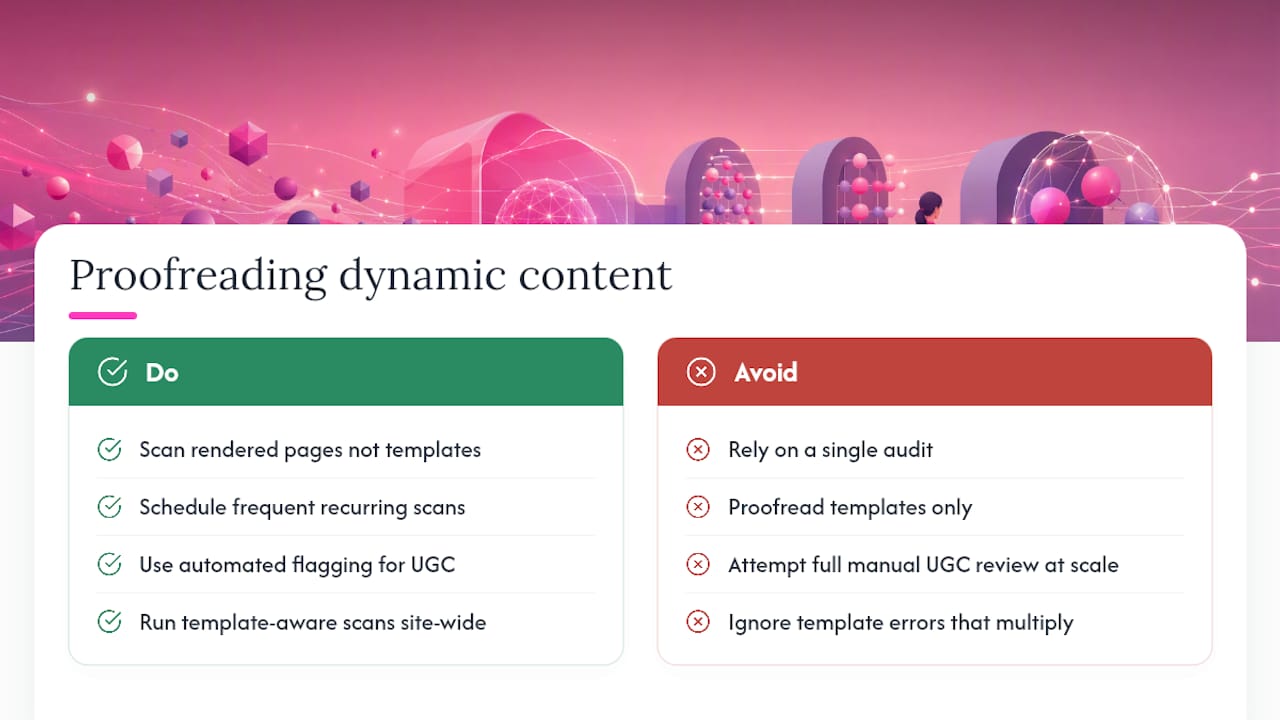
The practical fix is scanning rendered output rather than source templates alone, since a template can be flawless while the data populating it is not. Schedule recurring scans frequently enough to catch new dynamic content soon after it appears, rather than relying on a single audit that goes stale within weeks. For user-generated content such as reviews or forum posts, full manual proofreading is rarely realistic at volume. Automated flagging paired with lightweight moderation rules works better, catching obvious spelling errors and flagging anything that needs a human decision about tone or appropriateness.
Template errors deserve particular attention because they multiply. A single typo in a product template can appear on every product page site-wide, which is exactly the kind of error an automated scan with template awareness catches in one pass rather than requiring thousands of manual reviews.
Publisher perspective: what actually scales in enterprise proofreading
Most large-site proofreading fails not from lack of tools but from unclear ownership. Automation handles coverage well; the projects that stall are the ones where nobody decided who signs off on a fix. What actually scales is a small triage team with clear authority, a scan schedule nobody skips, and a habit of checking the full scanning app against real production pages rather than a staging copy.
— Website
How Websitespellchecker fits this workflow
Everything in this workflow, from full-site scans to scheduled recurring checks, maps directly onto what Websitespellchecker does for teams managing large sites. You get scan history you can compare month to month, multilingual profiles configured per language, and downloadable, shareable reports your developer or content team can act on without needing access to the tool itself.

Unlike a per-word agency retainer, you buy scan credits as you need them, with a free tier to test coverage before committing budget. Agencies and developers managing multiple client sites can review the developer and agency integration options for API and CI hooks, while anyone wanting to see output first can check a sample scan report before running their own. Start with a free scan on your homepage and top landing pages, then decide whether a full-site sweep makes sense for your next release cycle.
Sources
- Website Proofreading Services | Website Copy Editing | Proofed
- Website Proofreading | Bullet Proofreading